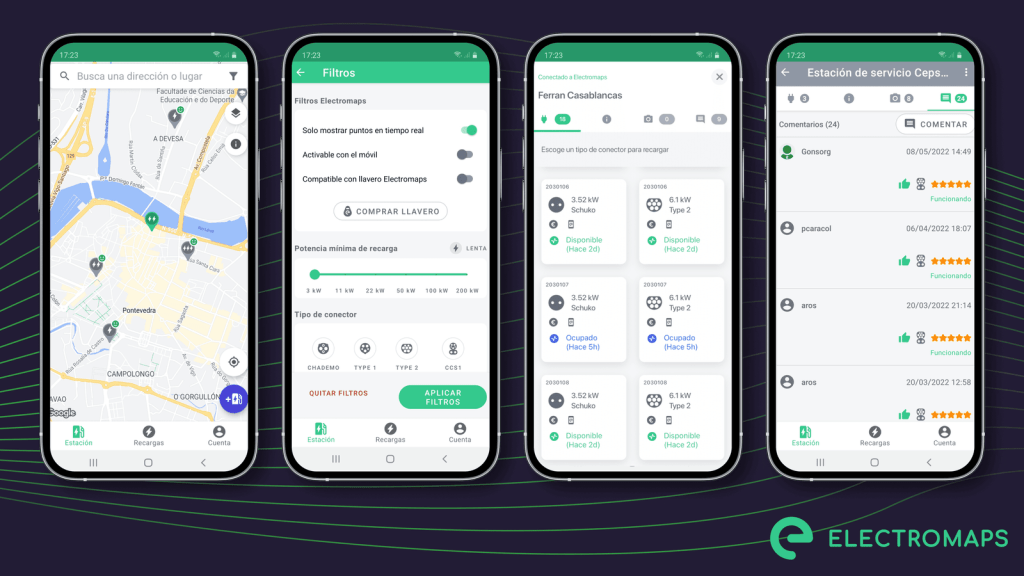
Electromaps is a mobile application that helps electric vehicle (EV) owners find charging stations nearby. This app provides real-time information on the availability, compatibility, and pricing of charging stations, making it convenient for users to plan their EV charging stops. Electromaps also allows users to filter charging stations based on different criteria, such as connector type and charging speed. Additionally, the app provides useful features like navigation to the selected charging station and user reviews to help EV owners make informed decisions.
Source electromaps.com
The Electromaps app offers several main features for electric vehicle (EV) owners. Here are some of its key features:
Charging Station Database: Electromaps provides a comprehensive database of charging stations worldwide, allowing users to easily locate available charging points.
Real-time Information: The app offers real-time information about the availability, compatibility, and pricing of charging stations, ensuring that users can plan their charging stops accordingly.
Filtering Options: Electromaps allows users to filter charging stations based on their specific needs, such as connector type, charging speed, and other criteria. This helps users find suitable charging options that meet their EV requirements.
Navigation: The app provides navigation features to guide users to their selected charging station, making it convenient to find and reach the desired location.
User Reviews: Electromaps includes user reviews and ratings for charging stations, enabling EV owners to make informed decisions based on the experiences shared by other users.
Overall, Electromaps offers a user-friendly experience by providing accurate and up-to-date information, filtering options, navigation assistance, and user reviews to enhance the convenience and reliability of EV charging.
Uruguay es efectivamente un país amigo de los vehículos eléctricos. El país ha estado realizando importantes esfuerzos para promover y apoyar la adopción de vehículos eléctricos. Aquí algunas razones por las que Uruguay se considera amigable con los vehículos eléctricos:
Infraestructura de carga: Uruguay tiene una red bien desarrollada de estaciones de carga en todo el país. Estas estaciones de carga están ampliamente disponibles, lo que hace que sea conveniente para los propietarios de vehículos eléctricos cargar sus vehículos.
Aplicación UTE Móvil: La aplicación UTE Móvil, desarrollada por la empresa eléctrica nacional de Uruguay, UTE (Administración Nacional de Usinas y Trasmisiones Eléctricas), permite a los usuarios gestionar sus sesiones de carga de vehículos eléctricos de manera eficiente. La aplicación proporciona información sobre estaciones de carga cercanas, disponibilidad e incluso permite pagar la electricidad consumida mediante una tarjeta de crédito.
Apoyo gubernamental: El gobierno uruguayo ha implementado diversas medidas para incentivar la adopción de vehículos eléctricos. Estos incluyen incentivos fiscales, exenciones de derechos de importación e incentivos financieros para la compra de vehículos eléctricos.
Energía Limpia: Uruguay ha logrado avances notables en la generación de electricidad a partir de fuentes renovables. La red eléctrica del país depende predominantemente de energía limpia, lo que hace que el uso de vehículos eléctricos sea aún más respetuoso con el medio ambiente.
Concientización y Educación: Uruguay ha estado promoviendo activamente la concientización y educación sobre los vehículos eléctricos. Esto ayuda a familiarizar al público con los beneficios, los procedimientos de carga y otros aspectos de los vehículos eléctricos.
En general, el compromiso de Uruguay de desarrollar la infraestructura necesaria, junto con el apoyo gubernamental y un enfoque en energía limpia, contribuye a hacer del país un entorno amigable para los vehículos eléctricos.
Mapa de cargadores para vehículos eléctricos en Uruguay. Fuente: UTE
Cuando se trata de cargar un coche eléctrico, tienes algunas opciones disponibles:
Carga en casa: La opción más cómoda y utilizada habitualmente es cargar el coche eléctrico en casa. Puede instalar una estación de carga de nivel 2, también conocida como conector de pared, en su residencia. Esto le permite cargar su vehículo durante la noche o cuando esté estacionado en casa. Se recomienda contratar a un electricista profesional para garantizar una instalación adecuada y el cumplimiento de las normas de seguridad.
Estaciones de carga públicas: muchos países, incluido Uruguay, tienen una red bien desarrollada de estaciones de carga públicas. Estas estaciones suelen estar ubicadas en estacionamientos públicos, centros comerciales y otras áreas públicas. Puede utilizar aplicaciones y sitios web que brinden información sobre la ubicación y disponibilidad de estas estaciones de carga para planificar sus viajes en consecuencia.
Carga en el lugar de trabajo: algunos empleadores ofrecen infraestructura de carga en el lugar de trabajo. Si tienes acceso a una estación de carga en tu oficina, puedes aprovecharla para cargar tu coche eléctrico durante el horario laboral.
Estaciones de carga rápida: Las estaciones de carga rápida, también conocidas como cargadores rápidos de CC o cargadores de nivel 3, proporcionan una velocidad de carga significativamente más rápida en comparación con los cargadores de nivel 2. Estas estaciones suelen encontrarse a lo largo de las rutas o ciudades, lo que permite una carga rápida durante viajes de larga distancia. Sin embargo, es importante tener en cuenta que no todos los coches eléctricos admiten carga rápida, así que asegúrese de que su vehículo sea compatible antes de utilizar estas estaciones.
Recuerde llevar siempre consigo su cable de carga, ya que diferentes estaciones de carga pueden requerir diferentes tipos de conectores. Además, planifique su viaje y las paradas de carga con antelación para garantizar una experiencia de carga cómoda y fluida.
Cargar un vehículo eléctrico en Uruguay es un proceso sencillo. Estos son los pasos a seguir:
Descarga la aplicación “UTE Móvil” desde tu App Store o Google Play. Esta aplicación te permite gestionar cómodamente las sesiones de carga de tu vehículo eléctrico.
Conecte su vehículo eléctrico a una estación de carga mediante un conector Tipo 2. Estas estaciones de carga están ampliamente disponibles en todo Uruguay.
Abre la aplicación UTE Móvil e inicia sesión con tus credenciales. Si no tiene una cuenta, puede crear una dentro de la aplicación.
Una vez que haya iniciado sesión, navegue hasta la sección de carga de la aplicación. Aquí encontrará un mapa con las estaciones de carga más cercanas.
Selecciona una estación de carga que se adapte a tus necesidades y consulta su disponibilidad. Las estaciones están disponibles por orden de llegada.
Una vez que haya seleccionado una estación de carga, siga las instrucciones en pantalla para iniciar el proceso de carga. Confirme la duración de la carga y el método de pago.
Para realizar el pago, puedes vincular una tarjeta de crédito a tu cuenta de la aplicación UTE Móvil. Esto le permite pagar fácilmente la electricidad consumida durante su sesión de carga.
Una vez procesado el pago, la estación de carga comenzará a suministrar electricidad a su vehículo eléctrico. Puede controlar el progreso de la carga a través de la aplicación o del mismo vehículo.
Recuerde desconectar su vehículo una vez completada la sesión de carga para permitir que otros usuarios utilicen la estación de carga. De lo contrario, es posible que se le cobre por utilizar el espacio cuando su batería esté al 100%. Esto es para desestimular que una persona deje su vehículo por ejemplo durante toda una jornada laboral, ocupando así el espacio y el cargador para otros usuarios.
Para más información y opciones alternativas, puede visitar la página oficial de la UTE (Administración Nacional de Usinas y Trasmisiones Eléctricas) en https://movilidad.ute.com.uy/
Uruguay is indeed a friendly country for electric vehicles. The country has been making significant efforts to promote and support the adoption of electric vehicles. Here are some reasons why Uruguay is considered friendly towards electric vehicles:
Charging Infrastructure: Uruguay has a well-developed network of charging stations across the country. These charging stations are widely available, making it convenient for electric vehicle owners to charge their vehicles.
UTE Móvil App: The UTE Móvil app, developed by Uruguay’s national electricity company UTE (Administración Nacional de Usinas y Trasmisiones Eléctricas), allows users to manage their electric vehicle charging sessions efficiently. The app provides information on nearby charging stations, availability, and even allows payments for the electricity consumed.
Government Support: The Uruguayan government has implemented various measures to encourage the adoption of electric vehicles. These include tax incentives, import duty exemptions, and financial incentives for purchasing electric vehicles.
Clean Energy: Uruguay has made remarkable progress in generating electricity from renewable sources. The country’s electrical grid predominantly relies on clean energy, making electric vehicle usage even more environmentally friendly.
Awareness and Education: Uruguay has been actively promoting awareness and education about electric vehicles. This helps familiarize the public with the benefits, charging procedures, and other aspects of electric vehicles.
Overall, Uruguay’s commitment to developing the necessary infrastructure, along with government support and a focus on clean energy, contributes to making the country a friendly environment for electric vehicles.
Map of electric car chargers in Uruguay. Source: UTE
When it comes to charging an electric car, you have a few options available to you:
Home Charging: The most convenient and commonly used option is to charge your electric car at home. You can install a Level 2 charging station, also known as a wall connector, at your residence. This allows you to charge your vehicle overnight or whenever it’s parked at home. It is recommended to hire a professional electrician to ensure proper installation and safety compliance.
Public Charging Stations: Many countries, including Uruguay, have a well-developed network of public charging stations. These stations are typically located in public parking lots, shopping centers, and other public areas. You can use apps and websites that provide information about the location and availability of these charging stations to plan your trips accordingly.
Workplace Charging: Some employers offer charging infrastructure at the workplace. If you have access to a charging station at your office, you can take advantage of it to charge your electric car during working hours.
Fast Charging Stations: Fast charging stations, also known as DC fast chargers or Level 3 chargers, provide a significantly faster charging speed compared to Level 2 chargers. These stations are typically found along highways, allowing for quick charging during long-distance journeys. However, it’s important to note that not all electric cars support fast charging, so make sure your vehicle is compatible before using these stations.
Remember to always carry your charging cable with you, as different charging stations may require different connector types. Additionally, plan your journey and charging stops in advance to ensure a smooth and convenient charging experience.
Charging an electric vehicle in Uruguay is a straightforward process. Here are the steps to follow:
Download the “UTE Móvil” app from your App Store or Google Play. This app allows you to manage your electric vehicle charging sessions conveniently.
Connect your electric vehicle to a charging station using a Type 2 connector. These charging stations are widely available across Uruguay.
Open the UTE Móvil app and log in using your credentials. If you don’t have an account, you can create one within the app.
Once logged in, navigate to the charging section of the app. Here, you will find a map displaying the nearest charging stations.
Select a charging station that suits your needs and check its availability. Some stations may require prior reservation, while others are available on a first-come, first-served basis.
Once you have selected a charging station, follow the on-screen instructions to initiate the charging process. Confirm the charging duration and payment method.
To make the payment, you can link a credit card to your UTE Móvil app account. This allows you to easily pay for the electricity consumed during your charging session.
Once the payment is processed, the charging station will start supplying electricity to your electric vehicle. You can monitor the charging progress through the app.
Remember to unplug your vehicle once the charging session is complete to allow other users to utilize the charging station. Otherwise, you may be charged by using the space when your battery is 100%.
For more information and alternative options, you can visit the official website of UTE (Administración Nacional de Usinas y Trasmisiones Eléctricas) at https://movilidad.ute.com.uy/
After rebooting your terminal that environment variable will be reset. to keep the changes, edit the .zprofile, in case you are using zsh, or the equivalent file in your home, and add the same line:
export SF_LOG_LEVEL=<code>trace
Remember to reboot your terminal (open and close) after modifying that file.
Check if the environment variable was written properly:
WordPress is a popular content management system (CMS) that allows users to create, manage, and customize websites and blogs. It provides a user-friendly interface and a wide range of themes and plugins to enhance functionality and design. WordPress is known for its flexibility, scalability, and community support, making it a top choice for individuals, businesses, and organizations of all sizes to create and manage their online presence.
WordPress is generally considered to be an easy-to-use content management system. It provides a user-friendly interface that allows users to create, edit, and publish content without requiring any coding knowledge. The dashboard is intuitive and includes helpful features such as a visual editor, media library, and plugin management. Additionally, WordPress has a large and supportive community that provides documentation, tutorials, and forums to assist users in navigating and maximizing the platform’s capabilities.
WordPress is not only for developers. While developers can certainly leverage the flexibility and extendability of WordPress by customizing themes and plugins, it is designed to be user-friendly for individuals with no coding experience as well. The user interface of WordPress is intuitive and allows users to create, manage, and publish content easily. The availability of a wide range of pre-built themes and plugins also enables users to customize their websites without any coding knowledge. However, having some development skills can provide more options and possibilities for advanced customization. Overall, WordPress caters to a diverse range of users, from beginners to developers.
WordPress itself is actually free to use. It is an open-source software that can be downloaded and installed on your own web hosting server. However, there are costs involved in creating and maintaining a WordPress website.
The main expenses associated with WordPress are web hosting and domain registration. Web hosting is the service that allows your website to be accessible on the internet, and it usually comes with a monthly or annual fee. The cost of web hosting can vary depending on the hosting provider and the specific plan you choose. Domain registration is the process of securing a unique web address for your website, and it also comes with a yearly fee.
Apart from the basic expenses, there might be additional costs if you choose to purchase premium themes or plugins to enhance your website’s design and functionality. However, there are also many free themes and plugins available in the WordPress community that can serve your purposes.
Overall, the cost of WordPress can vary depending on your specific needs and preferences. It is possible to create and maintain a WordPress website on a budget, but it is also possible to invest in premium services and features for a more customized experience.
WordPress offers a range of hosting plans designed to accommodate different needs and budgets. Here are some of the available plans:
Free WordPress.com: This plan is ideal for personal bloggers or those who want to explore WordPress without any upfront costs. It includes a WordPress.com subdomain (e.g., yourwebsite.wordpress.com), basic themes, and a limited set of features.
Personal Plan: This plan is suitable for individual bloggers and small website owners. It includes a custom domain name, email and live chat support, basic customization options, and removal of WordPress.com ads. The Personal Plan is affordable and provides more flexibility compared to the free plan.
Premium Plan: The Premium Plan is designed for freelancers and business owners who require more advanced features. It includes all the features of the Personal Plan, along with advanced customization options, advanced design tools, access to premium themes, and integration with Google Analytics.
Business Plan: The Business Plan is tailored for small to medium-sized businesses that need a professional online presence. It includes all the features of the Premium Plan, as well as access to premium themes, unlimited storage, SEO tools, and the ability to install third-party plugins.
eCommerce Plan: If you want to set up an online store, the eCommerce Plan is the right choice for you. It includes all the features of the Business Plan, along with additional features specifically designed for online selling, such as support for WooCommerce and integration with payment gateways.
VIP Hosting: WordPress also offers VIP Hosting, which is a fully managed hosting solution for large and high-traffic websites. It provides enterprise-level features, dedicated support, and scalability to handle significant amounts of traffic.
Please note that the availability of these plans may vary depending on your location and the specific hosting provider you choose. It’s recommended to visit the WordPress website or consult with a trusted hosting provider for the most up-to-date information on available plans.
Getting started with WordPress is relatively easy and straightforward. Here are the steps you can follow:
Set up a hosting account: Choose a web hosting provider that meets your needs. Look for reliable and affordable options. Some popular hosting providers include Bluehost, SiteGround, and GoDaddy.
Register a domain: Select and register a unique domain name for your website. A domain name is your website’s address on the internet (e.g., http://www.yourwebsite.com). Many hosting providers offer domain registration services as well.
Install WordPress: Most hosting providers offer a one-click WordPress installation option. Log in to your hosting account, navigate to the control panel, and look for the WordPress installation option. Follow the prompts to complete the installation.
Configure your website: After the installation is complete, you can access your WordPress dashboard. This is where you’ll manage and customize your website. Take some time to familiarize yourself with the dashboard and its features.
Choose a theme: WordPress offers a wide range of free and premium themes that determine the design and layout of your website. Go to the “Appearance” section in your dashboard and explore the available themes. Install and activate the one that suits your website’s purpose and style.
Customize your website: Once you’ve selected a theme, you can start customizing your website’s appearance and layout. Use the WordPress Customizer to modify colors, fonts, menus, and other visual aspects. Many themes also offer additional customization options specific to their design.
Add content: Start creating and adding content to your website. You can create pages for static content like About, Contact, and Services, and write posts for your blog. Use the WordPress editor to format and publish your content.
Expand functionality with plugins: WordPress plugins allow you to add more features and functionality to your website. From the dashboard, go to the “Plugins” section and explore the available options. Popular plugins include Yoast SEO for search engine optimization, WooCommerce for e-commerce functionality, and Contact Form 7 for creating contact forms.
Optimize your website: Make sure your website is fast, secure, and optimized for search engines. This includes optimizing images, installing a caching plugin, setting up website backups, and implementing a solid security plugin.
Promote your website: Once your website is up and running, it’s time to promote it. Share your content on social media, engage with your audience, and consider implementing search engine optimization (SEO) strategies to improve your website’s visibility in search engine results.
Remember, WordPress offers a vast amount of documentation, tutorials, and support forums to help you along the way. Don’t hesitate to explore these resources whenever you have questions or need assistance. Good luck with your WordPress journey!
Dreamforce is an annual multi-day conference hosted by Salesforce, a leading customer relationship management (CRM) platform. It is one of the largest technology events in the world, gathering industry leaders, professionals, developers, and Salesforce users from around the globe. Dreamforce features keynote speeches by industry pioneers, product announcements, hands-on training sessions, networking opportunities, and entertainment events. This event serves as a platform for learning, collaboration, and innovation within the Salesforce ecosystem.
Attending Dreamforce can provide you with valuable learning opportunities, the chance to network with industry professionals, and exposure to the latest innovations within the Salesforce ecosystem. If you are interested in expanding your knowledge of Salesforce, connecting with like-minded individuals, and staying updated on industry trends, Dreamforce could be a great event for you to consider attending. Ultimately, the decision should be based on your personal goals, interests, and availability.
Dreamforce offers various pricing options depending on the type of pass you choose and when you purchase your ticket. The cost of attending Dreamforce can vary from a few hundred dollars to several thousand dollars, depending on factors such as the pass type, early bird discounts, and additional add-ons. Salesforce also offers discounted rates for students, nonprofit organizations, and groups.
It’s important to consider that attending Dreamforce involves not just the ticket cost but also travel, accommodation, and other expenses. Additionally, prices for attending events and trainings within Dreamforce may also vary. Therefore, it’s recommended to check the official Dreamforce website for the most up-to-date pricing information and to carefully consider your budget and priorities before making a decision.
Dreamforce is not intended only for developers. While developers are certainly a significant part of the attendee base, Dreamforce is designed to appeal to a wide range of professionals, including industry leaders, Salesforce users, administrators, business analysts, marketers, and sales representatives. The event offers a diverse program with sessions, workshops, and networking opportunities tailored to various roles and interests within the Salesforce ecosystem. Whether you are a developer or someone else involved with Salesforce, Dreamforce can provide valuable learning opportunities and a chance to connect with like-minded individuals.
Tech debt, short for technical debt, refers to the concept of accumulated design and development trade-offs made during the software development process. It represents the additional work that needs to be done in the future suboptimal or incomplete solutions implemented in the present. Just like financial debt, tech debt must eventually be paid off.
Tech debt occurs when shortcuts, quick fixes, or temporary solutions are applied to meet development deadlines or address immediate needs. It often arises from compromises made in code quality, architectural decisions, testing procedures, documentation, or overall technical design. While these trade-offs may be necessary in the short term, they can lead to negative consequences in the long run, such as decreased efficiency, increased maintenance costs, reduced software quality, and limited scalability.
Managing tech debt is crucial for software engineering teams to ensure sustainable development practices. It involves recognizing and prioritizing areas with high debt, allocating resources to address and refactor the codebase, improving documentation, enhancing testing procedures, and continuously improving development practices. The goal is to strike a balance between delivering features on time and maintaining a healthy software ecosystem.
Tackling tech debt sooner rather than later is crucial for several reasons:
Reduced Maintenance Costs: As tech debt accumulates, it becomes increasingly expensive to maintain the software. Quick fixes and temporary solutions often require constant monitoring and regular updates, leading to higher costs over time. By addressing tech debt early on, you can prevent these maintenance costs from piling up.
Improved Efficiency: Tech debt can significantly hinder the efficiency of your development team. Suboptimal or incomplete solutions implemented in the present can lead to increased complexity, slower response times, and reduced productivity. By tackling tech debt early, you can streamline the development process and ensure smoother operations.
Enhanced Software Quality: Tech debt compromises the overall quality of your software. It can introduce bugs, decrease overall system stability, and make it harder to implement new features or enhancements. By proactively addressing tech debt, you can improve the quality of your software, making it more robust, reliable, and easier to maintain.
Increased Scalability: Ignoring tech debt can inhibit your software’s scalability. As the codebase becomes more cluttered and convoluted, it becomes harder to scale the system to accommodate growing user requirements and increased workloads. By tackling tech debt early, you can ensure that your software remains flexible and adaptable to future needs.
Sustainable Development Practices: Addressing tech debt is essential for maintaining sustainable development practices. By recognizing and prioritizing areas with high debt, allocating resources to refactor the codebase, and continuously improving development practices, you can foster a healthier software ecosystem. This, in turn, leads to increased developer morale, improved team collaboration, and more efficient releases.
In summary, tackling tech debt sooner rather than later helps reduce maintenance costs, improve efficiency, enhance software quality, increase scalability, and promote sustainable development practices. It is an investment that pays off in the long run by ensuring a healthier and more effective software ecosystem.
In Apex, you can use the HttpCalloutMock interface to mock HTTP callouts when writing unit tests for code that makes HTTP requests. This allows you to control the responses returned by the mock instead of making actual HTTP requests during testing. Here’s an example of how to use HttpCalloutMock in Apex:
Let’s say you have a class that makes an HTTP callout to an external service, and you want to write a unit test for it. First, you need to create a mock class that implements the HttpCalloutMock interface. This mock class will simulate the HTTP response you expect:
@IsTest
public class MyHttpCalloutMock implements HttpCalloutMock {
    // Implement the respond method to simulate the HTTP response.
    public HTTPResponse respond(HTTPRequest request) {
        // Create a new HTTPResponse object to mock the response.
        HTTPResponse response = new HTTPResponse();
        response.setHeader('Content-Type', 'application/json');
        response.setBody('{"message": "Mocked response"}');
        response.setStatusCode(200);

        return response;
    }
}
In this example, MyHttpCalloutMock implements the HttpCalloutMock interface and provides a mock response with a JSON body and a 200 status code.
Now, you can use this mock class in your unit test to simulate the HTTP callout:
@IsTest
public class MyHttpCalloutTest {
    @isTest static void testHttpCallout() {
        // Create an instance of the HttpCalloutMock class.
        HttpCalloutMock mock = new MyHttpCalloutMock();

        // Set the mock in the test context.
        Test.setMock(HttpCalloutMock.class, mock);

        // Call your code that makes the HTTP callout.
        // Replace this with the actual call to your HTTP request method.
        String response = MyHttpCalloutClass.makeHttpCallout();

        // Perform assertions on the response.
        System.assertEquals('{"message": "Mocked response"}', response);
    }
}
In the testHttpCallout method, we set the MyHttpCalloutMock as the mock for HTTP callouts using Test.setMock(). Then, we call the code that makes the HTTP callout, which will now use the mock response provided by MyHttpCalloutMock. Finally, we assert that the response matches the expected value.
This way, you can write unit tests for code that makes HTTP callouts without actually making external requests, ensuring predictable and controlled testing conditions.
No, you cannot make any callouts in Apex unit tests. Even if one day is possible, it is generally recommended to avoid making actual callouts to external services during unit testing. Instead, you should mock the callouts to ensure isolation, control, efficiency, and determinism in your tests.
Mocking callouts means simulating the responses you expect from the callouts without actually making the network requests. This approach helps you maintain consistent test results and reduces the reliance on external services during testing.
Mocking callouts in Apex is important for several reasons:
Isolation: By mocking callouts, you can isolate your Apex code from external dependencies. This means that your tests will not rely on external services or APIs, ensuring that they can be executed consistently, regardless of the availability or stability of those external services.
Control: Mocking allows you to have complete control over the responses received from the callouts. You can simulate different scenarios and responses, such as successful responses, error responses, or even timeouts, to thoroughly test how your code handles different situations.
Efficiency: Avoiding actual callouts during testing improves the efficiency of your test suite. Callouts involve network requests, which can be time-consuming and add unnecessary overhead to your tests. Mocking allows your tests to run faster since the responses are generated locally without the need for network communication.
Deterministic Testing: Mocking enables you to have predictable and deterministic tests. By defining the exact responses your code will receive, you can ensure consistent test results every time you run your tests, regardless of external factors.
Error Handling: Mocking callouts allows you to easily test and verify how your code handles various error scenarios. You can simulate different error conditions and ensure that your code behaves correctly by handling the errors and executing the appropriate error-handling logic.
Overall, mocking callouts in Apex provides a controlled and efficient way to test your code, helping you identify and fix issues early on, while ensuring the reliability and stability of your application.
To mock callouts in Apex unit tests, you can use the built-in Apex mocking framework. By implementing the HttpCalloutMock interface and defining the desired response in the respond method, you can simulate callout responses.
Here’s an example to illustrate the process:
@isTest
public class MockCallout implements HttpCalloutMock {
    public HttpResponse respond(HttpRequest req) {
        // Create and return the desired response data
        HttpResponse res = new HttpResponse();
        res.setHeader('Content-Type', 'application/json');
        res.setBody('{"example": "mock response"}');
        res.setStatusCode(200);
        return res;
    }
}

@isTest
public class MyCalloutClassTest {
    @isTest
    static void testCallout() {
        // Set the mock callout
        Test.setMock(HttpCalloutMock.class, new MockCallout());

        // Start test context
        Test.startTest();

        // Call the method that makes the callout
        MyCalloutClass myClass = new MyCalloutClass();
        myClass.makeCallout();

        // Stop test context
        Test.stopTest();

        // Assert the results
        // ...
    }
}
In this example, the MockCallout class implements the HttpCalloutMock interface to simulate the expected response. The MyCalloutClassTest test class sets the mock callout using Test.setMock and then calls the method that makes the callout. This enables you to test the behavior of your code without actually making the callout.
By following this approach, you can effectively mock callouts and perform thorough testing of your Apex code while maintaining control, efficiency, and deterministic results.

 javaniceday.com