javaniceday.com

  • Home
  • AboutAbout me
  • Subscribe
  • SalesforceSalesforce related content
  • Node JSNodejs related content
  • JavaJava related content
  • Electric Vehicles
  • Autos Eléctricos
  • Estaciones de carga UTE
  • Mapa cargadores autos eléctricos en Uruguay
  • Protect your social networks with two-factor authentication

    May 12th, 2021

    How much are you willing to pay to recover your Instagram account?
    Do you imagine opening your Twitter account one day and realizing you’ve been hacked? Nowadays a super complex password is not enough to avoid being hacked. In fact, most of the time your password is not guessed by trying until it works, a.k.a brutal force. Phishing or just social engineering is the most common way to gain access to your account. Believe it or not, most of the time you are the one that opens the door. If a hacker gains access to your Twitter account and notices you are an influencer and have many followers, he will probably ask you for money to recover your account.

    Enabling two-factor authentication in your social networks provides an additional layer of security to protect your accounts from unauthorized access. Here are a few reasons why you should enable it:

    1. Enhanced Account Security: Two-factor authentication adds an extra step to the login process, requiring a second form of verification along with your password. This significantly reduces the chances of someone gaining unauthorized access to your account, even if they manage to obtain your password.
    2. Protects Against Password Breaches: Password breaches are unfortunately common, and many people reuse passwords across different platforms. By enabling two-factor authentication, even if your password is compromised from one website or service, your account will still be protected because the hacker would also require access to your second factor of authentication.
    3. Defends Against Phishing Attacks: Phishing attacks are a common method used by hackers to trick users into revealing their login credentials. Two-factor authentication mitigates the risk of falling victim to such attacks by requiring a second, independent verification step. Even if someone obtains your username and password through phishing, they won’t be able to access your account without the second factor.
    4. Secures Personal Information: Social networks often contain a wealth of personal information, including photos, messages, and personal details. By enabling two-factor authentication, you add an extra layer of protection to prevent any unauthorized individuals from accessing and potentially misusing your personal information.
    5. Peace of Mind: Knowing that your social media accounts are secured with an extra layer of protection can provide peace of mind. You can engage with your followers, share content, and interact with others without worrying as much about the security of your accounts.

    Remember, it’s always recommended to use two-factor authentication to strengthen the security of your social media accounts and protect your online presence.

    Two-factor authentication is a good way to protect your accounts. It’s kind of a standard approach that many apps support nowadays, such as Twitter, Facebook and Instagram. This way you will need more than your password to enter your account.

    For those that are familiar with tokens, two-factor authentication is pretty similar. If you want to send money from your bank account, depending on the amount and the nature of the transaction, your bank will ask you for a token to complete the action

    Two-factor authentication is also known as two-step authentication which means, two actions from you will be necessary to gain access to your account.

    How to enable two-factor authentication in Instagram?

    Instagram image

    Instagram photo by Alexander Shatov on Unsplash

    These steps may change over time but the idea is the same

    • Open the menu
    • Go to Settings
    • Security
    • Two-factor authentication

    Select text message to receive an SMS with a code every time some tries to access your account

    Authenticator App. Is the same as SMS but with an app you install to get the code

    How to enable two-factor authentication in Twitter?

    twitter image

    Twitter photo by Christian Lue on Unsplash

    These steps may change over time but the idea is the same

    • Open the menu
    • Go to settings and privacy
    • Account
    • Security
    • Two-factor authentication

    Select text message to receive an SMS with a code every time some tries to access to your account . Authenticator App. Is the same as SMS but with an app you install to get the code


    Cover photo by Adem AY on Unsplash

    Share this:

    • Click to share on X (Opens in new window) X
    • Click to share on LinkedIn (Opens in new window) LinkedIn
    • Click to share on Reddit (Opens in new window) Reddit
    • Click to email a link to a friend (Opens in new window) Email
    Like Loading…
  • How to publish a message in SQS from SNS

    May 11th, 2021

    Overview

    Let say you want to process images in background or any other task that requires heavy processing and you don’t want to tie this operation to any other core operation or service.

    Suppose service A deals with users:

    • Sign in
    • Sign up
    • Forgot password
    • Profile update
    • etc

    Every time a user uploads an image to his profile you want to resize it and generate multiple thumbnails for multiple platforms or devices. You can do this operation under the same umbrella of service A but soon this business logic will grow up making our microservice a larger service.
    So, you decide to separate this kind of operations to a new microservice (service B) but how you communicate with each other?

    One option is to call the service directly but sounds you are tying bot services. Another option (here we go with this post) is to broadcast an event from service A called “profile updated”.

    Now we have to see how service B is notified to start processing the image and here is where SNS and SQS come.

    In the following example, I show you have to deploy an SNS topic that writes a message in an SQS queue. After that, you could have a Lambda function that is triggered by this queue but this is out of this scope.

    I strongly recommend that you start playing in a brand new project instead of trying to add more stuff to an existing one. Thus, will be easier to narrow down errors

    The Cloudformation template

          
    AWSTemplateFormatVersion: '2010-09-09'
    Transform: AWS::Serverless-2016-10-31
    Description: >
      Sample SAM Template SNS and SQS
    
    Parameters:
      Environment:
        Type: String
        Description: example, staging
    Resources:
      MyQueue:
        Type: AWS::SQS::Queue
        Properties:
          QueueName: !Sub "${Environment}-my-queue.fifo"
          FifoQueue: true
      MyTopic:
        Type: AWS::SNS::Topic
        Properties:
          ContentBasedDeduplication: true
          FifoTopic: true
          Subscription:
            - Endpoint:
                Fn::GetAtt:
                  - MyQueue
                  - Arn
              Protocol: sqs
          TopicName: !Sub "${Environment}-my-topic.fifo"
      MyQueuePolicy:
        Type: AWS::SQS::QueuePolicy
        DependsOn:
          - MyQueue
        Properties:
          PolicyDocument:
            Version: "2012-10-17"
            Statement:
              - Effect: Allow
                Principal:
                  Service:
                    - "events.amazonaws.com"
                    - "sqs.amazonaws.com"
                    - "sns.amazonaws.com"
                Action:
                  - "sqs:SendMessage"
                  - "sqs:ReceiveMessage"
                Resource:
                  Fn::GetAtt:
                    - MyQueue
                    - Arn
                Condition:
                  ArnEquals:
                    aws:SourceArn:
                      Ref: MyTopic
          Queues:
            - Ref: MyQueue
    Outputs:
      MyTopicTopicARN:
        Value:
          Ref: MyTopic
      MyQueue:
        Value:
          Fn::Join:
            - " "
            - - 'ARN:'
              - Fn::GetAtt:
                  - MyQueue
                  - Arn
              - 'URL:'
              - Ref: MyQueue


    Beware with indentations. Use a code formatted such as Webstorm to auto-format the document. Otherwise, you will get crazy looking at misleading errors

    Deploying using Sam

          
    sam build


    sam deploy --guided


    Resources

    • Fanout to Amazon SQS queues
    • Subscribing an Amazon SQS queue to an Amazon SNS topic
    • Using an AWS CloudFormation template to create a topic that sends messages to Amazon SQS queues

    Share this:

    • Click to share on X (Opens in new window) X
    • Click to share on LinkedIn (Opens in new window) LinkedIn
    • Click to share on Reddit (Opens in new window) Reddit
    • Click to email a link to a friend (Opens in new window) Email
    Like Loading…
  • About

    May 11th, 2021

    Hi, I’m Andrés Canavesi from Montevideo, Uruguay. I’m a Software Engineer, 36 years old, with over 10 years of experience in software development, mainly Java, Android, Salesforce, and Node JS.

    Andres Canavesi

    I like sharing my experience through this blog about problems I face daily.

    Get in touch through my networks:

    https://www.linkedin.com/in/andrescanavesi/

    https://github.com/andrescanavesi

    Photo by
    Vladislav Klapin on Unsplash

    Share this:

    • Click to share on X (Opens in new window) X
    • Click to share on LinkedIn (Opens in new window) LinkedIn
    • Click to share on Reddit (Opens in new window) Reddit
    • Click to email a link to a friend (Opens in new window) Email
    Like Loading…
  • Optimizing Node JS code

    May 11th, 2021

    At different levels you might optimize your JavaScript code. Sometimes optimization is a matter of good practices such as avoid using logging in loops.

    This is not a holy bible, it’s just a guide with some tips that can be implemented in your projects or not. There’s not recipes, just good practices.

    Most of these tips also can be applied also to other programming languages

    Logging

    It’s normal and necessary we add some log lines to have some clues when things go in the wrong direction. Logging is not cheap and even more if we print dynamic logs such as:

          
    console.log('My variable value is: '+myVar);


    As a thumb rule for logging is to avoid printing them in loops. So, avoid deploy code to production like this one:

          
    for(let i = 0; 1 < 10; i++){
      console.info('I am '+i);
    }


    SQL queries

    SQL queries are our big bottleneck most of the time so cache as much as possible to avoid unnecessary round trips.

    Luckily, there’s an easy way to know how much times does a particular SQL takes:

          
    console.time('myQuery');
    //execute query
    console.timeEnd('myQuery');


    The above code will print:

    myQuery: 2398ms

    Cache

    Web service cache level.
    I used the module apicache. By defaults, it works as an in-memory cache but you can also configure it to make it persistent with Redis.

    Database level
    I never used in Node a module that resolves database cache. I just stored some results in variables. That was enough for my requirements.

    async/await
    async and await keywords are great. Make our code more readable but sometimes we forget that we should parallelize as much as possible. Let see an example:

          
    // bad 
    async function getUserInfo(id) {
        const profile = await getUserProfile(id);
        const repo = await getUserRepo(id)
        return { profile, repo }
    }


    // good 
    async function getUserInfo(id) {
        const [profile, repo] = await Promise.all([
            getUserProfile(id),
            getUserRepo(id)
        ])
        return { profile, repo }
    }


    Promises

    This way we are running our heavy operation in the main thread (the Event Loop)

          
    return new Promise((resolve, reject) => {
            //my heavy operation
            return 'something';
        });


    This way the code runs in a separate thread, different than the Event Loop

          
    return  Promise.resolve().then(() => {
            //my heavy operation
            return 'something';
        });


    Some benchmark of this

          
    const size = 1000 * 1000 * 100;
    const array = new Array(size);
     
    function doSomethingHeavy() {
        let i = 0;
        while(i < array.length){
            i++;
        }
      }
     
      function doSomethingHeavyWithPromise(){
          return new Promise(function(resolve, reject){
              doSomethingHeavy();
              return 'done with promise';
          });
      }
     
      function doSomethingHeavyWithEnhancedPromise(){
        return Promise.resolve().then(function(value){
            doSomethingHeavy();
              return 'done with enhanced promise';
        });
    }
     
      console.time('promise');
      doSomethingHeavyWithPromise().then(function(result){
        console.info(result);  
      });
      console.timeEnd('promise'); 
      //prints: promise: 69.772ms (It's using the main thread blocking the event loop! )
     
      console.time('enhancedPromise');
      doSomethingHeavyWithEnhancedPromise()
      .then(function(result){
        console.info(result);  
         
      });
      console.timeEnd('enhancedPromise');
      //prints enhancedPromise: 0.135ms (it uses a separate thread leaving the event loop free for other requests)


    Different flavors of for

    In JavaScript, we have several ways to iterate using for sentence. Let see with an example to know which of them is the most efficient.

          
    const size = 1000 * 1000 * 10;
    const array = new Array(size);
    function doSomething() {
      let i = 0;
      i++;
    }
     
    console.time("classicForWithLength");
    for (let i = 0; i < array.length; i++) {
      doSomething();
    }
    console.timeEnd("classicForWithLength");
     
    console.time("classicForWithSize");
    for (let i = 0; i < size; i++) {
      doSomething();
    }
    console.timeEnd("classicForWithSize");
     
    console.time("forEach");
    array.forEach(element => {
      doSomething();
    });
    console.timeEnd("forEach");
     
    console.time("forIn");
    for (let e in array) {
      doSomething();
    }
    console.timeEnd("forIn");
     
    console.time("forOf");
    for (let e of array) {
      doSomething();
    }
    console.timeEnd("forOf");
     
    console.time("forEachWithFunction");
    array.forEach(function(item, index, object) {
      doSomething();
    });
    console.timeEnd("forEachWithFunction");
     
    console.time("forEachWithArrow");
    array.forEach((item, index, object) => {
      doSomething();
    });
    console.timeEnd("forEachWithArrow");


    The output of this script:

          
    classicForWithLength: 21.604ms
    classicForWithSize: 11.532ms
    forEach: 32.330ms
    forIn: 59.182ms
    forOf: 185.412ms
    forEachWithFunction: 32.033ms
    forEachWithArrow: 32.564ms


    Interesting conclusions we might write:

    The fastest is the classic for sentence

    i < constantValue is better than i < myCollection.length So you should use the classic for when iterating big collections! Tools Luckily we have a lot of awesome tools to make some benchmark such as jMeter o Artillery. They are used mostly to make web services load test.

    Artillery

    I used Artillery and it’s a nice tool. I started with a simple Hello World using CLI but also we might write some tests in YAML files.

    Share this:

    • Click to share on X (Opens in new window) X
    • Click to share on LinkedIn (Opens in new window) LinkedIn
    • Click to share on Reddit (Opens in new window) Reddit
    • Click to email a link to a friend (Opens in new window) Email
    Like Loading…
  • Customize styles highlight.js

    May 11th, 2021

    Create a file hljs-custom.css with the following content:

          
    /* custom hljs styles*/
    
    .hljs {
    	display: block;
    	overflow-x: auto;
    	padding: .5em;
    	background: #1d1f21
    }
    
    .hljs,
    .hljs-subst {
    	color: #c5c8c6
    }
    
    .hljs-comment {
    	color: #888
    }
    
    .hljs-attribute,
    .hljs-doctag,
    .hljs-keyword,
    .hljs-meta-keyword,
    .hljs-name,
    .hljs-selector-tag {
        font-weight: 700;
        color: #81a2be;
    }
    
    .hljs-deletion,
    .hljs-number,
    .hljs-quote,
    .hljs-selector-class,
    .hljs-selector-id,
    .hljs-string,
    .hljs-template-tag,
    .hljs-type {
    	color: #99cc99;
    }
    
    .hljs-section,
    .hljs-title {
    	color: #99cc99;
    	font-weight: 700
    }
    
    .hljs-link,
    .hljs-regexp,
    .hljs-selector-attr,
    .hljs-selector-pseudo,
    .hljs-symbol,
    .hljs-template-variable,
    .hljs-variable {
    	color: #bc6060
    }
    
    .hljs-literal {
    	color: #78a960
    }
    
    .hljs-addition,
    .hljs-built_in,
    .hljs-bullet,
    .hljs-code {
    	color: #de935f;
    }
    
    .hljs-meta {
    	color: #1f7199
    }
    
    .hljs-meta-string {
    	color: #4d99bf
    }
    
    .hljs-emphasis {
    	font-style: italic
    }
    
    .hljs-strong {
    	font-weight: 700
    }


    Include it as any other style sheet

          
    <link rel='stylesheet' href='/stylesheets/hljs-custom.css' />


    Photo by Aaron Burden on Unsplash

    Share this:

    • Click to share on X (Opens in new window) X
    • Click to share on LinkedIn (Opens in new window) LinkedIn
    • Click to share on Reddit (Opens in new window) Reddit
    • Click to email a link to a friend (Opens in new window) Email
    Like Loading…
  • Cache implementation in Node.js

    May 11th, 2021

    A cached value it’s dynamic data, expensive to calculate, that we make it constant during a period of time.

    There are several good modules in npm world but sometimes we don’t have enough flexibility in terms of customizations. In my case, I invested more time trying to tweak an existing module than develop my own

    Caching data can be as easy as a collection in memory that holds our most used records for the whole life cycle of our web app.
    For sure, that approach does not scale if our web app receives several hits or if we have a huge amount of records to load in memory.

    There is caching at different levels such as web or persistence. This implementation will cache data at the persistence layer.

    Take this implementation as a starting point. Probably won’t be the most optimized solution to resolve your problem. There’s no magic, you will have to spend some time until you get good results in terms of performance

    Among other reasons you will cache because:

    • Reduce response time
    • Reduce the stress of your database
    • Save money: less CPU, less memory, fewer instances, etc.
    • Let’s code a simple solution as a first attempt.

    If you want to go straight to the source code, go ahead https://github.com/andrescanavesi/node-cache

    I will use Express js framework and Node.js 12

    
    $ express --no-view --git node-cache
    
    create : node-cache/
    create : node-cache/public/
    create : node-cache/public/javascripts/
    create : node-cache/public/images/
    create : node-cache/public/stylesheets/
    create : node-cache/public/stylesheets/style.css
    create : node-cache/routes/
    create : node-cache/routes/index.js
    create : node-cache/routes/users.js
    create : node-cache/public/index.html
    create : node-cache/.gitignore
    create : node-cache/app.js
    create : node-cache/package.json
    create : node-cache/bin/
    create : node-cache/bin/www
    
    change directory:
    $ cd node-cache
    
    install dependencies:
    $ npm install
    
    run the app:
    $ DEBUG=node-cache:* npm start
    
    $ cd node-cache
    $ npm install
    

    Open the file app.js and remove the line

    
    app.use(express.static(path.join(__dirname, 'public')));
    

    Install nodemon to auto-restart our web app once we introduce changes

    
    npm install nodemon --save
    

    Open the file package.json and modify the line

    
    "start": "nodemon ./bin/www"
    

    Before was:

    
    "start": "node ./bin/www"
    

    Install the tools needed for tests

    
    npm install mocha --save-dev
    npm install chai --save-dev
    npm install chai-http --save-dev
    npm install nyc --save-dev
    npm install mochawesome --save-dev
    npm install randomstring --save-dev
    

    Maybe you already know mocha and chai but we also installed some extra tools:

    • nyc: code coverage.
    • mochawesome: an awesome HTML report with our test results.
    • randomstring: to generate some random data

    After installing them we need to make some configurations:

    • Create a folder called tests in the root of our project.
    • In our .gitignore file add reports folder to be ignored tests/reports/
    • Open package.json file and add a test command at scripts
    
    "scripts": {
    "start": "nodemon ./bin/www",
    "test": "NODE_ENV=test nyc --check-coverage --lines 75 --per-file --reporter=html --report-dir=./tests/reports/coverage mocha tests/test_*.js --recursive --reporter mochawesome --reporter-options reportDir=./tests/reports/mochawesome --exit"
    },
    

    Create a file tests/test_cache.js with some basic stuff in order to test configuration

    
    const app = require("../app");
    const chai = require("chai");
    const chaiHttp = require("chai-http");
    const assert = chai.assert;
    const expect = chai.expect;
    const {Cache} = require("../utils/Cache");
    
    // Configure chai
    chai.use(chaiHttp);
    chai.should();
    
    describe("Test Cache", function() {
       this.timeout(10 * 1000); //10 seconds
    
       it("should cache", async () => {
          //
       });
    });
    

    Execute tests to make sure everything is configured

    
    npm test
    

    The output will be something like this:

    
    Test Cache
    ✓ should cache
    
    
    1 passing (6ms)
    
    [mochawesome] Report JSON saved to /Users/andrescanavesi/Documents/GitHub/node-cache/tests/reports/mochawesome/mochawesome.json
    
    [mochawesome] Report HTML saved to /Users/andrescanavesi/Documents/GitHub/node-cache/tests/reports/mochawesome/mochawesome.html
    
    ERROR: Coverage for lines (29.41%) does not meet threshold (75%) for /Users/andrescanavesi/Documents/GitHub/node-cache/routes/index.js
    ERROR: Coverage for lines (50%) does not meet threshold (75%) for /Users/andrescanavesi/Documents/GitHub/node-cache/daos/dao_users.js
    ERROR: Coverage for lines (28.57%) does not meet threshold (75%) for /Users/andrescanavesi/Documents/GitHub/node-cache/utils/Cache.js
    npm ERR! Test failed. See above for more details.
    Tests failed and that’s ok because we did not implement any test. Let’s implement it later.
    

    Cache implementation

    Create a utils folder and our Cache.js file

    
    /**
     * @param name a name to identify this cache, example "find all users cache"
     * @param duration cache duration in millis
     * @param size max quantity of elements to cache. After that the cache will remove the oldest element
     * @param func the function to execute (our heavy operation)
     */
    module.exports.Cache = function(name, duration, size, func) {
        if (!name) {
            throw Error("name cannot be empty");
        }
        if (!duration) {
            throw Error("duration cannot be empty");
        }
        if (isNaN(duration)) {
            throw Error("duration is not a number");
        }
        if (duration < 0) {
            throw Error("duration must be positive");
        }
        if (!size) {
            throw Error("size cannot be empty");
        }
        if (isNaN(size)) {
            throw Error("size is not a number");
        }
        if (size < 0) {
            throw Error("size must be positive");
        }
        if (!func) {
            throw Error("func cannot be empty");
        }
        if (typeof func !== "function") {
            throw Error("func must be a function");
        }
     
        this.name = name;
        this.duration = duration;
        this.size = size;
        this.func = func;
        this.cacheCalls = 0;
        this.dataCalls = 0;
        /**
         * Millis of the lates cache clean up
         */
        this.latestCleanUp = Date.now();
        /**
         * A collection to keep our promises with the cached data.
         * key: a primitive or an object to identify our cached object
         * value: {created_at: <a date="">, promise: <the promise="">}
         */
        this.promisesMap = new Map();
    };
     
    /**
     * @returns
     */
    this.Cache.prototype.getStats = function(showContent) {
        const stats = {
            name: this.name,
            max_size: this.size,
            current_size: this.promisesMap.size,
            duration_in_seconds: this.duration / 1000,
            cache_calls: this.cacheCalls,
            data_calls: this.dataCalls,
            total_calls: this.cacheCalls + this.dataCalls,
            latest_clean_up: new Date(this.latestCleanUp),
        };
        let hitsPercentage = 0;
        if (stats.total_calls > 0) {
            hitsPercentage = Math.round((this.cacheCalls * 100) / stats.total_calls);
        }
        stats.hits_percentage = hitsPercentage;
        if (showContent) {
            stats.content = [];
            for (let [key, value] of this.promisesMap) {
                stats.content.push({key: key, created_at: new Date(value.created_at)});
            }
        }
        return stats;
    };
     
    /**
     * @param {*} key
     */
    this.Cache.prototype.getData = function(key) {
        if (this.promisesMap.has(key)) {
            console.info(`[${this.name}] Returning cache for the key: ${key}`);
            /*
             * We have to see if our cached objects did not expire.
             * If expired we have to get freshed data
             */
            if (this.isObjectExpired(key)) {
                this.dataCalls++;
                return this.getFreshedData(key);
            } else {
                this.cacheCalls++;
                return this.promisesMap.get(key).promise;
            }
        } else {
            this.dataCalls++;
            return this.getFreshedData(key);
        }
    };
     
    /**
     *
     * @param {*} key
     * @returns a promise with the execution result of our cache function (func attribute)
     */
    this.Cache.prototype.getFreshedData = function(key) {
        console.info(`[${this.name}] Processing data for the key: ${key}`);
        const promise = new Promise((resolve, reject) => {
            try {
                resolve(this.func(key));
            } catch (error) {
                reject(error);
            }
        });
        const cacheElem = {
            created_at: Date.now(),
            promise: promise,
        };
     
        this.cleanUp();
        this.promisesMap.set(key, cacheElem);
        return promise;
    };
     
    /**
     * @param {*} key
     */
    this.Cache.prototype.isObjectExpired = function(key) {
        if (!this.promisesMap.has(key)) {
            return false;
        } else {
            const object = this.promisesMap.get(key);
            const diff = Date.now() - object.created_at;
            return diff > this.duration;
        }
    };
    /**
     * Removes the expired objects and the oldest if the cache is full
     */
    this.Cache.prototype.cleanUp = async function() {
        /**
         * We have to see if we have enough space
         */
        if (this.promisesMap.size >= this.size || Date.now() - this.latestCleanUp > this.duration) {
            let oldest = Date.now();
            let oldestKey = null;
            //iterate the map to remove the expired objects and calculate the oldest objects to
            //be removed in case the cache is full after removing expired objects
            for (let [key, value] of this.promisesMap) {
                if (this.isObjectExpired(key)) {
                    console.info(`the key ${key} is expired and will be deleted form the cache`);
                    this.promisesMap.delete(key);
                } else if (value.created_at < oldest) {
                    oldest = value.created_at;
                    oldestKey = key;
                }
            }
     
            //if after this clean up our cache is still full we delete the oldest
            if (this.promisesMap.size >= this.size && oldestKey !== null) {
                console.info(`the oldest element with the key ${oldestKey} in the cache was deleted`);
                this.promisesMap.delete(oldestKey);
            }
        } else {
            console.info("[cleanUp] cache will not be cleaned up this time");
        }
    };
     
    /**
     * Resets all the cache.
     * Useful when we update several values in our data source
     */
    this.Cache.prototype.reset = function() {
        this.promisesMap = new Map();
        this.latestCleanUp = Date.now();
        this.cacheCalls = 0;
        this.dataCalls = 0;
    };
    

    Full source code: https://github.com/andrescanavesi/node-cache

    Share this:

    • Click to share on X (Opens in new window) X
    • Click to share on LinkedIn (Opens in new window) LinkedIn
    • Click to share on Reddit (Opens in new window) Reddit
    • Click to email a link to a friend (Opens in new window) Email
    Like Loading…
  • Better Queue in Node JS

    May 11th, 2021

    Overview

    Good practice in software development is to delegate as much heavy work as possible to background jobs to avoid blocking the main execution of your application that can be a web app, mobile app, or desktop.

    Send email notifications it’s the typical scenario where you should execute it in background.

    More scenarios

    • Image processing
    • Data aggregation / migration / conversion
    • Push notifications

    Some platforms offer cheaper CPU running in background so you can save money in addition to user experience.

    Why is it important

    Imagine several users making requests to your server that lasts more than 30 seconds or one minute. Your web app will get slow soon because HTTP connections are not infinite.

    Queue several jobs it’s pretty easy but what it’s no easy is to process them one by one or in batches, set states, retry if some of them fail, etc.

    This is a common problem so you shouldn’t implement a solution from scratch

    Better Queue

    From many solutions we have in Node JS, better-queue module is a good one.

    Better Queue is designed to be simple to set up but still let you do complex things.

    From better-queue:
    By default, it uses an in-memory queue but to configure a persistent queue with Redis or MySQL is pretty easy because there are drivers written for better-queue.

    More features

    • Persistent (and extendable) storage
    • Batched processing
    • Prioritize tasks
    • Merge/filter tasks
    • Progress events (with ETA!)
    • Fine-tuned timing controls
    • Retry on fail
    • Concurrent batch processing
    • Task statistics (average completion time, failure rate and peak queue size)
    Photo by Halacious on Unsplash

    Share this:

    • Click to share on X (Opens in new window) X
    • Click to share on LinkedIn (Opens in new window) LinkedIn
    • Click to share on Reddit (Opens in new window) Reddit
    • Click to email a link to a friend (Opens in new window) Email
    Like Loading…
  • 5 reasons to host your images on Cloudinary

    May 11th, 2021

    Overview

    Image and video management are present in almost all of our projects. I would like to share my experience with this.

    As a newbie developer, you think you are resolving a problem for the very first time and nobody faced it in the past. Now, as an experienced Engineer, I always ask myself “Someone else would have this problem before” and then I open a browser with Google. Seems obvious but ask that question is not always the first option for everyone.

    Even though we are creating something that doesn’t exist yet, probably all the ways to that awesome implementations are a set of known problems.

    That said, why should I worry about image and video management? Seems easy to upload an image to a server and display it on a beautiful page but problems come when we want to scale. So, my recommendation is to avoid image management in-house implementation as much as possible.

    Cloudinary offers a good back office to manage our assets and an awesome API to integrate easily with our applications written in any language.

    “Cloudinary is a cloud-based service that provides an end-to-end image and video management solution.”


    You can create a free account and make some tests. I recommend you first upload some images and play around image manipulation through the URL and after that go ahead with some SDK.

    1 – SDKs for many languages

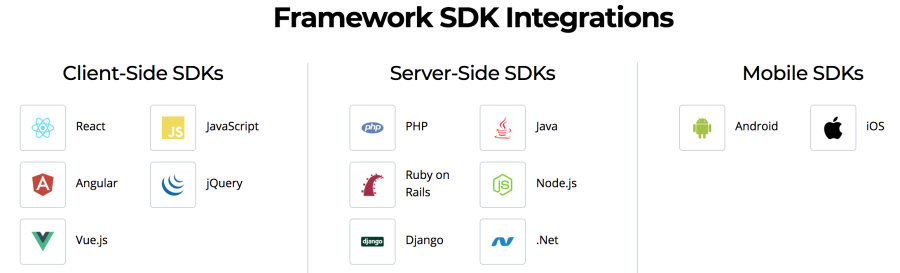
    Cloudinary provides SDKs for the most used languages making integration super easy.

    cloudinary SDKs

    2 – Image manipulation on the fly

    Dynamic URLs to manipulate on the fly.

    As easy as this URL:


    https://res.cloudinary.com/demo/image/upload/w_400,h_400,c_crop,g_face,r_max/w_200/lady.jpg

    There are several parameters to manipulate an image. I recommend you read more about in
    Cloudinary documentation

    3 – Awesome documentation

    Cloudinary has awesome documentation that explains super clear how to configure your account, manipulate images, videos through URL or SDK.

    4 – Nice delivery time

    Cloudinary serves images from different CDNs; what it means that your users will see your assets from the nearest server based on geolocation. This way, latency is pretty small for most of the users.

    Read more about Cloudinary CDN

    5 – Image recognition and categorization

    Cloudinary provides Artificial Intelligence for image recognition and categorization. This means that your image will be categorized automatically to be recognized later if you use the right parameters. Also, you will be able to provide your own tags to train your own assets.

    This how the API responses after uploading an image with auto tag enabled.

    
    { "tag": "pink", "confidence": 0.822 },
    { "tag": "flower", "confidence": 0.6306 },
    { "tag": "flowers", "confidence": 0.3778 },


    Read more about how to Cloudinary recognizes and categorizes your assets

    Conclusion

    Even if you just want to display images and/or videos in your site or mobile app without any kind of manipulation, you should think about third-party services to delegate that task. Also if you are making a Proof of Concept that includes images and/or videos you don’t need to implement assets uploading, you might take advantage of SDKs.

    Photo by Max Langelott on Unsplash

    Share this:

    • Click to share on X (Opens in new window) X
    • Click to share on LinkedIn (Opens in new window) LinkedIn
    • Click to share on Reddit (Opens in new window) Reddit
    • Click to email a link to a friend (Opens in new window) Email
    Like Loading…
  • Clean up more than two spaces and new lines with regex

    May 11th, 2021

    Regular expressions are those I don’t use so frequently so I need to wrap them all in a method with a short explanation about what they do.
    So I created a simple JavaScript method that removes all newlines and multiple spaces (including tab spaces) by a single space

    /**
     * It replace all new lines and multiple spaces (including tab spaces) by a single space
     * @param {string } text
     * @return {string} a new cleaned string
     */
    function cleanUpSpaces(text) {
        if (!text) {
            return text;
        }
        // s{2,} matches any white space (length >= 2) character (equal to [rntfv ])
        return text.replace(/s{2,}/g, ' ');
    };

    Output example

          
    // given
    `SELECT *
                FROM account        WHERE id =    1234`
    
    // output
    SELECT * FROM account WHERE id = 1234


    Share this:

    • Click to share on X (Opens in new window) X
    • Click to share on LinkedIn (Opens in new window) LinkedIn
    • Click to share on Reddit (Opens in new window) Reddit
    • Click to email a link to a friend (Opens in new window) Email
    Like Loading…
  • Migrate sforce.connection.query to Lightning equivalent

    May 11th, 2021

    As you probably know, JavaScript buttons are not supported in Lightning Experience (LEX). In particular, you can’t use REQUIRESCRIPT.

    In this post, the idea is to show how to migrate a particular JavaScript button that uses sforce.connection.query sentence.

    Suppose our JavaScript button is like this:

          
    {!REQUIRESCRIPT("/soap/ajax/37.0/connection.js")} 
    {!REQUIRESCRIPT("/soap/ajax/37.0/apex.js")} 
     
    var query ="SELECT Id, Name FROM Account LIMIT 10";
    var queryRecords= sforce.connection.query(query);
    var records = queryRecords.getArray("records"); 
    //Do something with the records...


    A Lightning equivalent solution requires several steps. I assume that you have some knowledge about Lightning Components development as well as Apex development.

    Well, let’s go!

    Create a Lightning component called MyQueryResult and Its JavaScript controller

    MyQueryResult.cmp

          
    <aura:component controller="MyQueryResultService" >
        <aura:attribute name="queryResult" type="SObject[]" />
        <aura:handler name="init" value="{!this}" action="{!c.doInit}"/>
      
        <!-- It just displays the results. Modify It depending on your needs -->
        <aura:iteration items="{! v.queryResult}" var="item">
            {!item.Id} - {!item.Name}<br/>
         </aura:iteration>
    </aura:component>


    MyQueryResult.js

          
    ({
        doInit : function(component, event, helper) {
            var myQuery = 'SELECT Id, Name FROM Account LIMIT 10';
            var action = component.get("c.executeQuery");
            action.setParams({
                "theQuery": myQuery
            });
            action.setCallback(this, function(response) {
                var state = response.getState();
                if(state == "SUCCESS" && component.isValid()){
                    console.log("success") ;
                    var queryResult = response.getReturnValue();
                    console.log(queryResult);
                    component.set("v.queryResult", queryResult);
                }else{
                    console.error("fail:" + response.getError()[0].message); 
                }
            });
            $A.enqueueAction(action);
        }
    })


    We will need also a service (an Apex class) to execute our query

    MyQueryResultService

          
    public class MyQueryResultService {
     
        @AuraEnabled
        public static List executeQuery(String theQuery){
            try{
                String query = String.escapeSingleQuotes(theQuery);
                return Database.query(query);
            }catch(Exception e){
                throw new AuraHandledException('Error doing the query: '+theQuery+' Error: '+e.getMessage());
            }
        }
    }


    After that, we need a quick action pointing to our component.

    The last step is to add our quick action to the layouts we need

    Read more about this at Lightning Alternatives to JavaScript Buttons

    Photo by Glenn Carstens-Peters on Unsplash

    Share this:

    • Click to share on X (Opens in new window) X
    • Click to share on LinkedIn (Opens in new window) LinkedIn
    • Click to share on Reddit (Opens in new window) Reddit
    • Click to email a link to a friend (Opens in new window) Email
    Like Loading…
←Previous Page
1 … 15 16 17 18 19 … 25
Next Page→

  • LinkedIn
  • GitHub
  • WordPress

Privacy PolicyTerms of Use

Website Powered by WordPress.com.

  • Subscribe Subscribed
    • javaniceday.com
    • Already have a WordPress.com account? Log in now.
    • javaniceday.com
    • Subscribe Subscribed
    • Sign up
    • Log in
    • Report this content
    • View site in Reader
    • Manage subscriptions
    • Collapse this bar
%d