javaniceday.com

  • Home
  • AboutAbout me
  • Subscribe
  • SalesforceSalesforce related content
  • Node JSNodejs related content
  • JavaJava related content
  • Electric Vehicles
  • Autos Eléctricos
  • Estaciones de carga UTE
  • Mapa cargadores autos eléctricos en Uruguay
  • Bye bye FindBugs. Hello SpotBugs

    February 12th, 2019

    I used to use FindBugs plugin in my Java projects to detect and learn about issues and potential issues in my source code.

    Even FindBugs is no longer maintained we have an alternative called SpotBugs.

    It requires Maven version 3.1.1 to be executed

    Is not so different to use, just add the plugin like any other plugin in your pom.xml file:

    <plugin>
        <groupId>com.github.spotbugs</groupId>
        <artifactId>spotbugs-maven-plugin</artifactId>
        <version>3.1.11</version>
        <executions>
            <execution>
                <goals>
                    <goal>check</goal>
                    <goal>gui</goal>
                    <goal>help</goal>
                    <goal>spotbugs</goal>
                </goals>
                <id>check</id>
            </execution>
        </executions>
        <configuration>
            <foo>bar</foo>
        </configuration>
    </plugin>

    And then execute:

    mvn spotbugs:check

    After checking our code we may display our bugs in a friendly manner

    mvn spotbugs:gui
    SpotBugs plugin GUI
    SpotBugs GUI

    Method may fail to close stream
    The method creates an IO stream object, does not assign it to any fields, pass it to other methods that might close it, or return it, and does not appear to close the stream on all paths out of the method.  This may result in a file descriptor leak.  It is generally a good idea to use a finally block to ensure that streams are closed.

    Example error message when we forget to close streams

    Tip: normally we don’t want to execute SpotBugs every time we compile our project so let’s create a profile to skip it

    <profile>
        <id>default</id>
        <properties>
            <spotbugs.skip>true</spotbugs.skip>
        </properties>
        <activation>
            <activeByDefault>true</activeByDefault>
        </activation>
    </profile>

    And let’s create a profile to execute it:

    <profile>
        <id>runSpotBugs</id>
        <properties>
            <spotbugs.skip>false</spotbugs.skip>
        </properties>
    </profile>

    And execute like this:

    mvn clean install -PrunSpotBugs

    Photo by Bud Helisson on Unsplash
    Share this:

    • Click to share on X (Opens in new window) X
    • Click to share on LinkedIn (Opens in new window) LinkedIn
    • Click to share on Reddit (Opens in new window) Reddit
    • Click to email a link to a friend (Opens in new window) Email
    Like Loading…
  • Migrate $User, $Profile, $Label and $Api to Lightning Components

    September 9th, 2018

    We can’t use $User, $Profile, $Label and $Api in Lightning. We need to implement a server-side solution.

    Original JS button

    alert($User.Email)
    

    Create a Lightning component

    JSMUserInfo.cmp

    <aura:component implements="force:lightningQuickAction" controller="JSMUserInfoService" >
      <aura:attribute name="user" type="JSMUserInfo" />
      <aura:handler name="init" value="{!this}" action="{!c.doInit}"/>
    
      Id: {!v.user.Id}
      <br/>
      First name: {!v.user.FirstName}
      <br/>
      Last name: {!v.user.LastName}
      <br/>
      Email: {!v.user.Email}
    
    </aura:component>
    

    JSMUserInfo.js

    ({
      doInit : function(component, event, helper) {
        var action = component.get("c.getUserInfo");
        action.setCallback(this, function(response) {
          var state = response.getState();
          if(state == "SUCCESS" && component.isValid()){
            console.log("success") ;
            var result = response.getReturnValue();
            console.log(result);
            console.log(result.FirstName);
            component.set("v.user", result);
    
       }else{
         console.error("fail:" + response.getError()[0].message); 
        }
       });
      $A.enqueueAction(action);
    }
    })
    

    A wrapper class containing the user info we need

    public class JSMUserInfo{
      @AuraEnabled
      public String Id {get;set;}
      @AuraEnabled
      public String FirstName {get;set;}
      @AuraEnabled
      public String LastName {get;set;}
      @AuraEnabled
      public String Email {get;set;}
    }
    

    The server-side controller that exposes the User’s info

    public class JSMUserInfoService {
    
    @AuraEnabled
    public static JSMUserInfo getUserInfo(){
      try{
        JSMUserInfo info = new JSMUserInfo();
        info.Id = Userinfo.getUserId();
        info.FirstName = Userinfo.getFirstName();
        info.LastName = Userinfo.getLastName();
        info.Email = Userinfo.getUserEmail();
        return info;
      }catch(Exception e){
         throw new AuraHandledException(e.getMessage()); 
      }
    
      } 
    }
    

    We can use a similar approach for $Api or any other global variable

    $Profile

    @AuraEnabled
    public static Profile getProfileInfo(){
      try{
        String profileId = UserInfo.getProfileId();
        Profile profile = [SELECT Id, Name FROM Profile WHERE Id =:profileId];
        return profile;
      }catch(Exception e){
        throw new AuraHandledException(e.getMessage()); 
      }
    }
    

    $Site

    @AuraEnabled
    public static JSMSiteInfo getSiteInfo(){
      try{
        JSMSiteInfo info = new JSMSiteInfo();
        info.Prefix = Site.getPathPrefix();
        info.Domain = Site.getDomain();
        info.Name = Site.getName();
        return info;
      }catch(Exception e){
        throw new AuraHandledException(e.getMessage()); 
      }
    }
    

    I would like yo hear your feedback. Did it work? Did you face some issue? Please leave your comment

    WordPress.com

    Photo by Clark Young on Unsplash

    Subscribe to this blog

    Share this:

    • Click to share on X (Opens in new window) X
    • Click to share on LinkedIn (Opens in new window) LinkedIn
    • Click to share on Reddit (Opens in new window) Reddit
    • Click to email a link to a friend (Opens in new window) Email
    Like Loading…
  • How to convert sforce.apex.execute to Lightning

    September 8th, 2018

    Let’s see how to convert a Salesforce JavaScript button that uses sforce.apex.execute in to Lightning Experience.

    The good news is you will reuse this code and the approach for all your similar buttons

    Imagine you have this JavaScript button in your Salesforce instance. OK, probably your button is larger and more complex but the idea is the same

    {!requireScript("/soap/ajax/20.0/connection.js")} 
    {!requireScript("/soap/ajax/20.0/apex.js")}
    
    sforce.apex.execute("JSMMyExecuteClass", "myExecuteMethod", {param1:"Im param1",param2:"Im param2"}); 
    window.location = 'https://google.com';
    

    In the example above we want to invoke the method myExecuteMethod that belongs to the Apex class JSMMyExecuteClass and you will pass these parameters {param1:"Im param1",param2:"Im param2"}

    After that, it redirects to google.com

    There’s not a direct solution (aka point and click) so we have to work a little bit

    The first step is to create a Lightning component:

    JSMMyButton.cmp

    <aura:component implements="force:lightningQuickAction" controller="JSMMyExecuteClass" >
    
      <aura:handler name="init" value="{!this}" action="{!c.doInit}"/>
    
    </aura:component>
    

    The controller part of my component is called JSMMyButton.js

    ({
      doInit : function(component, event, helper) {
        var action = component.get("c.myExecuteMethodAura");
        action.setParams({
          "param1": 'Im param1',
          "param2": 'Im param2'
        });
        action.setCallback(this, function(response) {
        var state = response.getState();
    
        if(state == "SUCCESS" && component.isValid()){
          console.log("success") ;
          var result = response.getReturnValue();
          console.log(result);
    
          var urlRedirect = "https://www.google.com/search?q="+result;
          var urlEvent = $A.get("e.force:navigateToURL");
          urlEvent.setParams({
            "url": urlRedirect
          });
          urlEvent.fire();
        }else{
          console.error("fail:" + response.getError()[0].message); 
        }
      });
      $A.enqueueAction(action);
      }
    })
    

    In JSMMyExecuteClass we need to create an equivalent method to call from our js controller:

    public class JSMMyExecuteClass {
    
      public String myExecuteMethod(String param1, String param2){
        return 'ok '+param1+' - '+param2;
      }
    
      @AuraEnabled
      public static String myExecuteMethodAura(String param1, String param2){
        return new JSMMyExecuteClass().myExecuteMethod(param1, param2);
      }
    }
    

    Create a quick action that points to our component

    Add the quick action to the layout(s) you want

    That’s all. You can use this approach again for others button you have that require some code.

    Maybe this video is interesting for you: Journey to Lightning Experience: Convert Your JavaScript Buttons

    WordPress.com

    Photo by Artem Sapegin on Unsplash

    Share this:

    • Click to share on X (Opens in new window) X
    • Click to share on LinkedIn (Opens in new window) LinkedIn
    • Click to share on Reddit (Opens in new window) Reddit
    • Click to email a link to a friend (Opens in new window) Email
    Like Loading…
  • Why adopt Heroku

    September 8th, 2018

    A short introduction

    This post is built from a developer perspective where the main task we do daily is (obviously) development. So if you are a sysadmin guy, Heroku will like you at the beginning but soon you will have your hands tied since flexibility is not the main feature.

    It’s not a complete guide and probably won’t be enough to take a decision but sure will be useful to start to investigate a bit more about this great platform.

    What is Heroku?

    Heroku is a platform as a service (PaaS)  acquired by Salesforce in 2011.

    Let’s say it’s a smart hosting for your web apps (*)

    (*) Even you can deploy a daemon (a.k.a Heroku worker), I would bet that most of the software deployed on Heroku are web applications

    You developed your web application and then what?

    Yo created a beautiful web application and now you want to publish it under your own domain  http://www.myawesomeapp.com. You have a couple of options. One option is to hire a Virtual Private Server (VPS). Another option is to hire a dedicated server. Both of them require some sysadmin knowledge because most of the time you get a (literally) an OS with enough software to boot. For sure that has some advantages such as total control of security and performance. The main disadvantage I see is you lost focus on development to pay attention to backups, security, deployments, etc.

    Concentrate on development, not in deployment

    Even if you build  your own blog where you document your experiences, you need a 99% uptime so you will have these main tasks:

    1. Development
    2. Configure the production environment
    3. Deployment
    4. Writing
    5. Backups
    6. Scale. Ok, only if you write lots and interesting articles 🙂

    Seems lots of tasks just for a personal blog, right? (**)

    Most of those tasks you can delegate to Heroku and concentrate more on development.

    (**) That was just an example. For a personal blog, I really recommend WordPress

    Advantages

    • Great support
    • Nice uptime
    • Large list of Add-ons
    • A free plan to start learning and to have your testing environment (unless you do stress testing).

    Disadvantages

    • Flexibility. Is not like a VPS where you are able to customize lots of things such as web server configuration and even the OS.

    But wait… is not too expensive?

    The answer depends on the value you add to your time and headaches.

    Since most of the time we don’t have a sysadmin guy on our team, we will have to that work, taking time from our main task: development our cool app.

    My experience with Java and Heroku

    I’m involved in the Java world for 9 years and even more if I count years from the university. However, I started to use Heroku less than two years ago. In the past, I used to configure a server from scratch, install Tomcat, Glassfish, MySql, Iptables, Mail server (very painful), Apache, PHP, JRE, etc. Even it’s hard, it’s also fun to learn and see how sysadmin guys suffer 🙂

    Currently, I’m involved in some projects with Java plus Heroku and It feels very comfortable do deployments just with one command without configuring so much stuff.

    Security

    If you deal with sensitive data such as Salesforce org data, Heroku offers private spaces that have (among other things) special configuration for those cases.

    Anything else?

    Do you think I did not mention an important feature?

    Probably there are lots of things I did not mention in this post, so now it’s your turn.

    Share this:

    • Click to share on X (Opens in new window) X
    • Click to share on LinkedIn (Opens in new window) LinkedIn
    • Click to share on Reddit (Opens in new window) Reddit
    • Click to email a link to a friend (Opens in new window) Email
    Like Loading…
  • Get Visualforce usage stats from VisualforceAccessMetrics

    June 7th, 2018

    If you want to know how frequently your Visualforce pages are accessed, you just have to run a simple query on VisualforceAccessMetrics:

    SELECT ApexPageId,DailyPageViewCount,Id,MetricsDate FROM VisualforceAccessMetrics
    

    That query will return stats from the latest 90 days

    Page views are tallied the day after the page is viewed, and each VisualforceAccessMetrics object is removed after 90 days.

    But BEWARE, that query could return deleted pages. To fix that, let’s tweak the query to:

    SELECT Id, Markup, Name, NamespacePrefix FROM ApexPage WHERE Id IN (SELECT ApexPageId FROM VisualforceAccessMetrics)
    

    Now the query will return only existing pages.

    Photo by Kevin Ku on Unsplash


    Astro image comes from SLDS

    Share this:

    • Click to share on X (Opens in new window) X
    • Click to share on LinkedIn (Opens in new window) LinkedIn
    • Click to share on Reddit (Opens in new window) Reddit
    • Click to email a link to a friend (Opens in new window) Email
    Like Loading…
  • Need Help Converting Your Classic JavaScript Buttons to Quick Actions?

    May 31st, 2018

    Sara Morgan's avatar

    In last weeks Lightning Keynote for TrailheaDX, Eric Jacobsen told everyone that an analysis done by his group showed that there are over 2 Million Javascript buttons in Salesforce Classic today.

    WOW!!! That’s a lot of buttons that still need to be converted to Lightning Quick Actions.

    This has been a not so fun task lingering over many Salesforce developer heads for quite some time. I imagine this one issue has been the main reason many Salesforce orgs have been hesitant to fully adopt Lightning.

    So now my question to you is, “Do you think you need help converting your JavaScript buttons to Quick Actions?”

    If you answered yes, then the good news is that the help is coming. Eric announced in that very same keynote that a new tool called the Lightning Configuration Converterwill be available in late Spring 18.

    The new tool will…

    View original post 208 more words

    Share this:

    • Click to share on X (Opens in new window) X
    • Click to share on LinkedIn (Opens in new window) LinkedIn
    • Click to share on Reddit (Opens in new window) Reddit
    • Click to email a link to a friend (Opens in new window) Email
    Like Loading…
  • Do you really need a mobile app?

    May 31st, 2018

    I see lots of brands advertising “Hey, download our mobile app and…” …and you will have a menu with 5 items. The most complex item probably will be a form with 3 o 4 fields and one submit button. Ah, I almost forgot… a success message!

    – Do you really need a mobile app?

    – Sure! I need user location and push notifications for some requirements.

    -Well, browsers have those features nowadays, so why don’t you develop a web app with a good JavaScript framework?

    I’m not a big fan of JavaScript but I must recognize its portability and that’s a good reason to begin

    The main advantage is obvious: you will code only once. Also, you will skip Google Play and App Store submission.

    Any disadvantage? Well, JavaScript but that’s only personal.

    Remember KISS: Keep It Simple and Stupid


    Share this:

    • Click to share on X (Opens in new window) X
    • Click to share on LinkedIn (Opens in new window) LinkedIn
    • Click to share on Reddit (Opens in new window) Reddit
    • Click to email a link to a friend (Opens in new window) Email
    Like Loading…
  • [Salesforce] A pie chart in Campaign’s record page

    May 26th, 2018

    Introduction

    What about if we add a component with a pie chart in the Campaign object’s record page? It’s very useful to see how the campaign is going in terms of leads’ statuses. So we want to know the percentage of leads converted, not converted, contacted etc.

    I will use Lightning in a Developer org that I just created to take advantage of its default data. So let’s go!

    Assumption

    You are familiar with a Salesforce org, Lightning and you have created some reports in the past. If you haven’t created any report yet, you can read this module in Trailhead: Reports & Dashboards for Lightning Experience

    Add leads to a campaign

    First of all, let’s add some leads to a campaign.  You only have to add leads to a campaign, you don’t have to create any data.

    Create the report

    Go to Reports, New Report, expand Campaigns, select Campaign with leads and click on Create.

    Drag Lead status field and group by this field

    group-by-report

    Save the report with the name you want and, importantly, in a public folder.

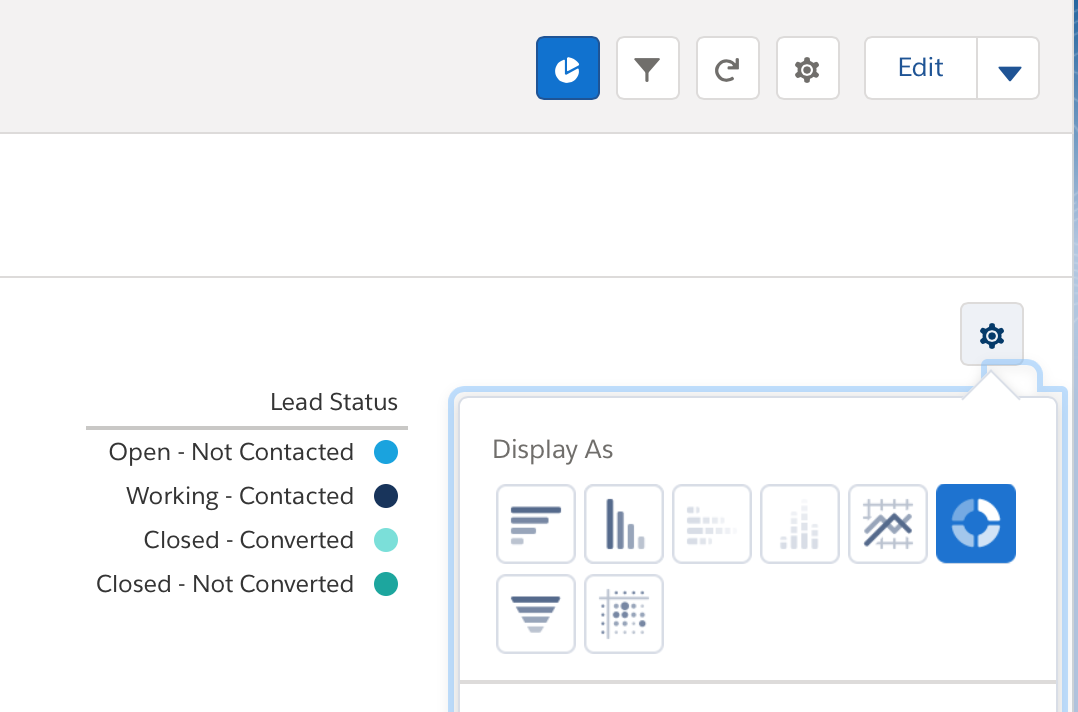
    Run the report and add a pie chart. Don’t forget to save it.

    chart-attributes

    Add the report component

    Now let’s add our report to the Campaign’s record page.

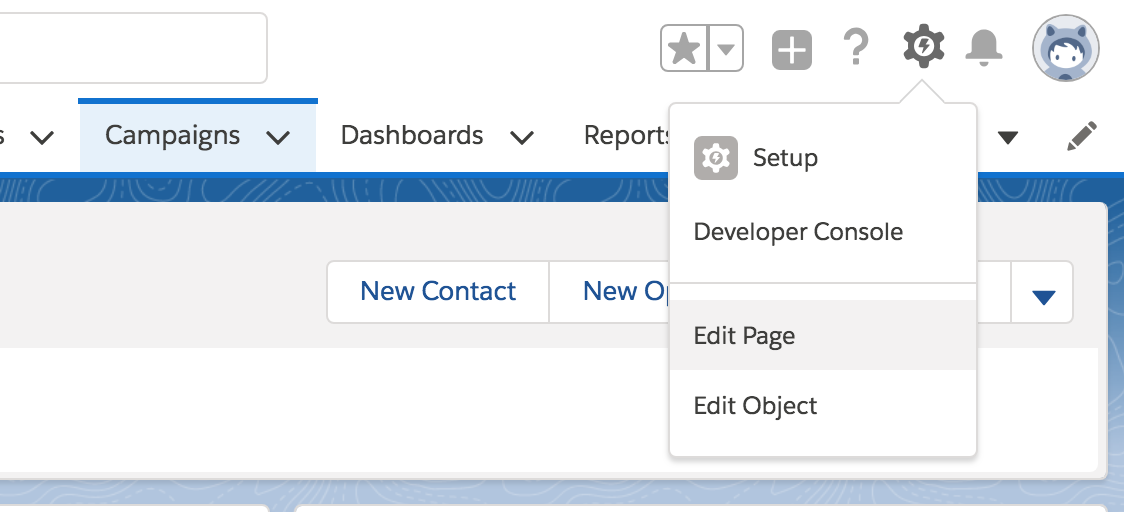
    Open any campaign and Edit Page to open the App Builder.

    edit-page.png

    Drag the Report Chart component and set those parameters

    app-builder.png

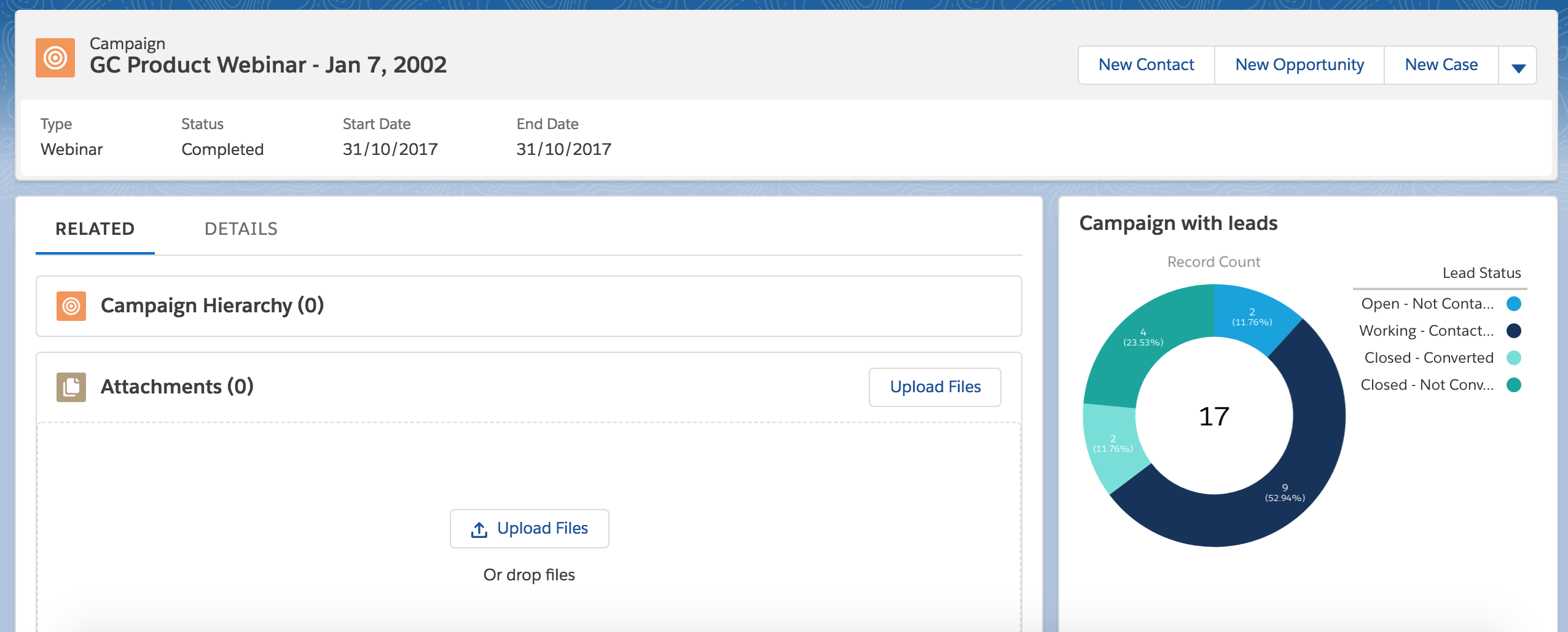
    Save the page and press Back to see the record page again with the report

    record-page-with-report.png


    Share this:

    • Click to share on X (Opens in new window) X
    • Click to share on LinkedIn (Opens in new window) LinkedIn
    • Click to share on Reddit (Opens in new window) Reddit
    • Click to email a link to a friend (Opens in new window) Email
    Like Loading…
  • Migrate sforce.connection.query to Lightning equivalent

    January 14th, 2018

    Are you looking for a way to migrate your existing Salesforce Apex code with sforce.connection.query to its Lightning equivalent? You’ve come to the right place!

    The sforce.connection.query class is used to execute SOQL queries in Salesforce JavaScript buttons.

    As you probably know, JavaScript buttons are not supported in Lightning Experience (LEX). In particular, you can’t use REQUIRESCRIPT.

    In this post, the idea is to show how to migrate a particular JavaScript button that uses sforce.connection.query sentence.

    Suppose our JavaScript button is like this:

    {!REQUIRESCRIPT("/soap/ajax/37.0/connection.js")} 
    {!REQUIRESCRIPT("/soap/ajax/37.0/apex.js")} 
    var query ="SELECT Id, Name FROM Account LIMIT 10";
    var queryRecords= sforce.connection.query(query);
    var records = queryRecords.getArray("records"); 
    //Do something with the records...

    A Lightning equivalent solution requires several steps. I assume that you have some knowledge about Lightning Components development as well as Apex development.

    Well, let’s go!

    Create a Lightning component called MyQueryResult and Its JavaScript controller

    MyQueryResult.cmp

    <aura:component controller="MyQueryResultService" >
     <aura:attribute name="queryResult" type="SObject[]" />
     <aura:handler name="init" value="{!this}" action="{!c.doInit}"/>
     
        <!-- It just displays the results. Modify It depending on your needs -->
        <aura:iteration items="{! v.queryResult}" var="item">
            {!item.Id} - {!item.Name}<br/>
         </aura:iteration>
    </aura:component>

    MyQueryResult.js

    ({
        doInit : function(component, event, helper) {
            var myQuery = 'SELECT Id, Name FROM Account LIMIT 10';
            var action = component.get("c.executeQuery");
            action.setParams({
                "theQuery": myQuery
            });
            action.setCallback(this, function(response) {
                var state = response.getState();
                if(state == "SUCCESS" && component.isValid()){
                    console.log("success") ;
                    var queryResult = response.getReturnValue();
                    console.log(queryResult);
                    component.set("v.queryResult", queryResult);
                }else{
                    console.error("fail:" + response.getError()[0].message); 
                }
            });
            $A.enqueueAction(action);
        }
    })

    We will need also a service  (an Apex class) to execute our query

    MyQueryResultService

    public class MyQueryResultService {
        @AuraEnabled
        public static List<sObject> executeQuery(String theQuery){
            try{
                String query = String.escapeSingleQuotes(theQuery);
                return Database.query(query);
            }catch(Exception e){
                throw new AuraHandledException('Error doing the query: '+theQuery+' Error: '+e.getMessage());
            }
        }
    }

    After that, we need a quick action pointing to our component.

    The last step is to add our quick action to the layouts we need

    Read more about this at Lightning Alternatives to JavaScript Buttons

    Share this:

    • Click to share on X (Opens in new window) X
    • Click to share on LinkedIn (Opens in new window) LinkedIn
    • Click to share on Reddit (Opens in new window) Reddit
    • Click to email a link to a friend (Opens in new window) Email
    Like Loading…
  • A template of Java web and Heroku

    August 27th, 2017

    I’ve worked in several projects with Java, specially Java web using Tomcat as a web container and then Glassfish as application server.

    Lastly I’m working in Java projects deployed on Heroku, an amazing platform acquired by Salesorce.

    I faced many problems configuring deployment, JPA with Tomcat, oauth Salesforce flow, etc. so I decided to gather them in a template:

    https://github.com/andrescanavesi/java-web-heroku-template

    Share this:

    • Click to share on X (Opens in new window) X
    • Click to share on LinkedIn (Opens in new window) LinkedIn
    • Click to share on Reddit (Opens in new window) Reddit
    • Click to email a link to a friend (Opens in new window) Email
    Like Loading…
←Previous Page
1 … 22 23 24 25
Next Page→

  • LinkedIn
  • GitHub
  • WordPress

Privacy PolicyTerms of Use

Website Powered by WordPress.com.


Loading Comments...
 

    • Subscribe Subscribed
      • javaniceday.com
      • Already have a WordPress.com account? Log in now.
      • javaniceday.com
      • Subscribe Subscribed
      • Sign up
      • Log in
      • Report this content
      • View site in Reader
      • Manage subscriptions
      • Collapse this bar
    %d