javaniceday.com

  • Home
  • AboutAbout me
  • Subscribe
  • SalesforceSalesforce related content
  • Node JSNodejs related content
  • JavaJava related content
  • Electric Vehicles
  • Autos Eléctricos
  • Estaciones de carga UTE
  • Mapa cargadores autos eléctricos en Uruguay
  • Test Driven Development (TDD) in a nutshell

    December 5th, 2019

    Every project has somewhere in the src folder a file called utils.js, Utils.java, utils.py, etc. A couple of days ago I was looking for a way to generate a random float number between two integer numbers. Utils.xx was a good place to put a function called getRandomNumberBetween(min,max).

    In my case I was working with Node.js, so my function was

    module.exports.getRandomNumberBetween = function (min, max) {
        return Math.random() * (max - min) + min;
    }
    

    Seems a super basic function but it hides several scenarios to test.

    • What happen if min is null
    • And max?
    • What happen if any of them is negative?
    • What happen if min is greater than max?
    • What if there are strings?

    Sometimes simple function involves more time testing than implement it

    I found this example a good way to explain what TDD is.

    Formally, TDD means Test Driven Development but in your day by day means “to write tests before your main code”. Let’s use our random function example to explain TDD steps.

    The first step is to think what I want:

    I want a method that receives two integer numbers and returns a random float number between them

    The second step is to start writing test cases

    describe("getRandomNumberBetween", function() {
        it("should return a random number between positive range", function(done) {
            const min = 4;
            const max = 5;
            const random = Utils.getRandomNumberBetween(min, max);
            assert.isTrue(random >= min);
            assert.isTrue(random <= max);
    
            done();
        });
    
        it("should return a random number between negative range", function(done) {
            const min = -8;
            const max = -1;
            const random = Utils.getRandomNumberBetween(min, max);
            assert.isTrue(random >= min);
            assert.isTrue(random <= max);
    
            done();
        });
    
        it("should get an error with null min", function(done) {
            const min = null;
            const max = 10;
            try {
                Utils.getRandomNumberBetween(min, max);
                assert.fail("should throw an error");
            } catch (e) {
                assert.equal(e.message, "min is empty");
            }
    
            done();
        });
    
        it("should get an error with null max", function(done) {
            const min = 10;
            const max = null;
            try {
                Utils.getRandomNumberBetween(min, max);
                assert.fail("should throw an error");
            } catch (e) {
                assert.equal(e.message, "max is empty");
            }
    
            done();
        });
    
        it("should get an error with undefined min", function(done) {
            let min;
            const max = 10;
            try {
                Utils.getRandomNumberBetween(min, max);
                assert.fail("should throw an error");
            } catch (e) {
                assert.equal(e.message, "min is empty");
            }
    
            done();
        });
    
        it("should get an error with undefined max", function(done) {
            const min = 10;
            let max;
            try {
                Utils.getRandomNumberBetween(min, max);
                assert.fail("should throw an error");
            } catch (e) {
                assert.equal(e.message, "max is empty");
            }
            done();
        });
    });
    

    And the last step is to write the code that makes all the tests pass

    /**
     *
     * @param min
     * @param max
     * @returns {number} a number between min and max
     */
    module.exports.getRandomNumberBetween = function (min, max) {
        if (this.isEmpty(min)) {
            throw Error('min is empty');
        }
        if (this.isEmpty(max)) {
            throw Error('max is empty');
        }
        if (isNaN(min)) {
            throw Error('min is Nan');
        }
        if (isNaN(max)) {
            throw Error('max is Nan');
        }
        return Math.random() * (max - min) + min;
    };
    

    Steps 2 and 3 are iterations that you will stop when you cover all your scenarios and all tests are green.

    Did you see? A simple one-line method triggered a big test suite!

    If you are using Node.js, I strongly recommend the package nyc to see the coverage of your source code. That package will help you a lot if you forgot to test a particular scenario.

    Photo by Markus Spiske on Unsplash

    Share this:

    • Click to share on X (Opens in new window) X
    • Click to share on LinkedIn (Opens in new window) LinkedIn
    • Click to share on Reddit (Opens in new window) Reddit
    • Click to email a link to a friend (Opens in new window) Email
    Like Loading…
  • ImageKit.io: Image Optimization That Plugs Into Your Infrastructure — CSS-Tricks

    December 3rd, 2019

    Images are the most efficient means to showcase a product or service on a website. They make up for most of the visual content on our website. But, the more images a webpage has, the more bandwidth it consumes, affecting the page load speed – a raging factor having a significant impact on not just […]

    ImageKit.io: Image Optimization That Plugs Into Your Infrastructure — CSS-Tricks

    Photo by Barn Images on Unsplash

    Share this:

    • Click to share on X (Opens in new window) X
    • Click to share on LinkedIn (Opens in new window) LinkedIn
    • Click to share on Reddit (Opens in new window) Reddit
    • Click to email a link to a friend (Opens in new window) Email
    Like Loading…
  • Cache implementation in Node.js

    December 3rd, 2019

    A cached value it’s a dynamic data (expensive to calculate), that we make it constant during a period of time.

    Tweet

    I know: there are several good modules in npm world but sometimes we don’t have enough flexibility in terms of customizations. In my case I invested more time trying to tweak an existing module than develop my own

    Cache data can be as easy as a collection in memory that holds our most used records for the whole life cycle of our web app. For sure, that approach does not scale if we our web app receives several hits or if we have a huge amount of records to load in memory.

    There are cache at different levels such as web or persistence. This implementation will cache data at persistence layer.

    Take this implementation as a starting point. Probably won’t be the most optimized solution to resolve your problem. There’s not magic, you will have to spend some time until you get good results in terms of performance

    Among others reasons you will cache because:

    • Reduce response time
    • Reduce stress of your database
    • Save money: less CPU, less memory, less instances, etc.

    Let’s code a simple solution as a first attempt.

    If you want to go straight to the source code, go ahead https://github.com/andrescanavesi/node-cache

    I will use Express js framework and Node.js 12

    $ express --no-view --git node-cache
    
       create : node-cache/
       create : node-cache/public/
       create : node-cache/public/javascripts/
       create : node-cache/public/images/
       create : node-cache/public/stylesheets/
       create : node-cache/public/stylesheets/style.css
       create : node-cache/routes/
       create : node-cache/routes/index.js
       create : node-cache/routes/users.js
       create : node-cache/public/index.html
       create : node-cache/.gitignore
       create : node-cache/app.js
       create : node-cache/package.json
       create : node-cache/bin/
       create : node-cache/bin/www
    
       change directory:
         $ cd node-cache
    
       install dependencies:
         $ npm install
    
       run the app:
         $ DEBUG=node-cache:* npm start
    
    $ cd node-cache
    $ npm install
    

    Open the file app.js and remove the line

    app.use(express.static(path.join(__dirname, 'public')));
    

    Install nodemon to auto-restart our web app once we introduce changes

    npm install nodemon --save
    

    Open the file package.json and modify the line

    "start": "nodemon ./bin/www"
    

    Before was:

    "start": "node ./bin/www"
    

    Install the tools needed for tests

    npm install mocha --save-dev
    npm install chai --save-dev
    npm install chai-http --save-dev
    npm install nyc --save-dev
    npm install mochawesome --save-dev
    npm install randomstring --save-dev
    

    Maybe you already know mocha and chai but we also installed some extra tools:

    • nyc: code coverage.
    • mochawesome: an awesome html report with our test results.
    • randomstring: to generate some random data

    After installing them we need to make some configurations:

    • Create a folder called tests in the root of our project.
    • In our .gitignore file add reports folder to be ignored tests/reports/
    • Open package.json file and add a test command at scripts
     "scripts": {
            "start": "nodemon ./bin/www",
            "test": "NODE_ENV=test nyc --check-coverage --lines 75 --per-file --reporter=html --report-dir=./tests/reports/coverage mocha tests/test_*.js --recursive --reporter mochawesome --reporter-options reportDir=./tests/reports/mochawesome --exit"
        },
    

    Create a file tests/test_cache.js with some basic stuff in order to test configuration

    const app = require("../app");
    const chai = require("chai");
    const chaiHttp = require("chai-http");
    const assert = chai.assert;
    const expect = chai.expect;
    const {Cache} = require("../utils/Cache");
    
    // Configure chai
    chai.use(chaiHttp);
    chai.should();
    
    describe("Test Cache", function() {
        this.timeout(10 * 1000); //10 seconds
    
        it("should cache", async () => {
            //
        });
    });


    Execute tests to make sure everything is configured

    npm test
    

    The output will be something like this

      Test Cache
        ✓ should cache
    
    
      1 passing (6ms)
    
    [mochawesome] Report JSON saved to /Users/andrescanavesi/Documents/GitHub/node-cache/tests/reports/mochawesome/mochawesome.json
    
    [mochawesome] Report HTML saved to /Users/andrescanavesi/Documents/GitHub/node-cache/tests/reports/mochawesome/mochawesome.html
    
    ERROR: Coverage for lines (29.41%) does not meet threshold (75%) for /Users/andrescanavesi/Documents/GitHub/node-cache/routes/index.js
    ERROR: Coverage for lines (50%) does not meet threshold (75%) for /Users/andrescanavesi/Documents/GitHub/node-cache/daos/dao_users.js
    ERROR: Coverage for lines (28.57%) does not meet threshold (75%) for /Users/andrescanavesi/Documents/GitHub/node-cache/utils/Cache.js
    npm ERR! Test failed.  See above for more details.
    

    Tests failed and that’s ok because we did not implement any test. Let’s implement it later.

    Cache implementation

    Create a utils folder and our Cache.js file

    /**
     * @param name a name to identify this cache, example "find all users cache"
     * @param duration cache duration in millis
     * @param size max quantity of elements to cache. After that the cache will remove the oldest element
     * @param func the function to execute (our heavy operation)
     */
    module.exports.Cache = function(name, duration, size, func) {
        if (!name) {
            throw Error("name cannot be empty");
        }
        if (!duration) {
            throw Error("duration cannot be empty");
        }
        if (isNaN(duration)) {
            throw Error("duration is not a number");
        }
        if (duration < 0) {
            throw Error("duration must be positive");
        }
        if (!size) {
            throw Error("size cannot be empty");
        }
        if (isNaN(size)) {
            throw Error("size is not a number");
        }
        if (size < 0) {
            throw Error("size must be positive");
        }
        if (!func) {
            throw Error("func cannot be empty");
        }
        if (typeof func !== "function") {
            throw Error("func must be a function");
        }
    
        this.name = name;
        this.duration = duration;
        this.size = size;
        this.func = func;
        this.cacheCalls = 0;
        this.dataCalls = 0;
        /**
         * Millis of the lates cache clean up
         */
        this.latestCleanUp = Date.now();
        /**
         * A collection to keep our promises with the cached data.
         * key: a primitive or an object to identify our cached object
         * value: {created_at: <a date>, promise: <the promise>}
         */
        this.promisesMap = new Map();
    };
    
    /**
     * @returns
     */
    this.Cache.prototype.getStats = function(showContent) {
        const stats = {
            name: this.name,
            max_size: this.size,
            current_size: this.promisesMap.size,
            duration_in_seconds: this.duration / 1000,
            cache_calls: this.cacheCalls,
            data_calls: this.dataCalls,
            total_calls: this.cacheCalls + this.dataCalls,
            latest_clean_up: new Date(this.latestCleanUp),
        };
        let hitsPercentage = 0;
        if (stats.total_calls > 0) {
            hitsPercentage = Math.round((this.cacheCalls * 100) / stats.total_calls);
        }
        stats.hits_percentage = hitsPercentage;
        if (showContent) {
            stats.content = [];
            for (let [key, value] of this.promisesMap) {
                stats.content.push({key: key, created_at: new Date(value.created_at)});
            }
        }
        return stats;
    };
    
    /**
     * @param {*} key
     */
    this.Cache.prototype.getData = function(key) {
        if (this.promisesMap.has(key)) {
            console.info(`[${this.name}] Returning cache for the key: ${key}`);
            /*
             * We have to see if our cached objects did not expire.
             * If expired we have to get freshed data
             */
            if (this.isObjectExpired(key)) {
                this.dataCalls++;
                return this.getFreshedData(key);
            } else {
                this.cacheCalls++;
                return this.promisesMap.get(key).promise;
            }
        } else {
            this.dataCalls++;
            return this.getFreshedData(key);
        }
    };
    
    /**
     *
     * @param {*} key
     * @returns a promise with the execution result of our cache function (func attribute)
     */
    this.Cache.prototype.getFreshedData = function(key) {
        console.info(`[${this.name}] Processing data for the key: ${key}`);
        const promise = new Promise((resolve, reject) => {
            try {
                resolve(this.func(key));
            } catch (error) {
                reject(error);
            }
        });
        const cacheElem = {
            created_at: Date.now(),
            promise: promise,
        };
    
        this.cleanUp();
        this.promisesMap.set(key, cacheElem);
        return promise;
    };
    
    /**
     * @param {*} key
     */
    this.Cache.prototype.isObjectExpired = function(key) {
        if (!this.promisesMap.has(key)) {
            return false;
        } else {
            const object = this.promisesMap.get(key);
            const diff = Date.now() - object.created_at;
            return diff > this.duration;
        }
    };
    /**
     * Removes the expired objects and the oldest if the cache is full
     */
    this.Cache.prototype.cleanUp = async function() {
        /**
         * We have to see if we have enough space
         */
        if (this.promisesMap.size >= this.size || Date.now() - this.latestCleanUp > this.duration) {
            let oldest = Date.now();
            let oldestKey = null;
            //iterate the map to remove the expired objects and calculate the oldest objects to
            //be removed in case the cache is full after removing expired objects
            for (let [key, value] of this.promisesMap) {
                if (this.isObjectExpired(key)) {
                    console.info(`the key ${key} is expired and will be deleted form the cache`);
                    this.promisesMap.delete(key);
                } else if (value.created_at < oldest) {
                    oldest = value.created_at;
                    oldestKey = key;
                }
            }
    
            //if after this clean up our cache is still full we delete the oldest
            if (this.promisesMap.size >= this.size && oldestKey !== null) {
                console.info(`the oldest element with the key ${oldestKey} in the cache was deleted`);
                this.promisesMap.delete(oldestKey);
            }
        } else {
            console.info("[cleanUp] cache will not be cleaned up this time");
        }
    };
    
    /**
     * Resets all the cache.
     * Useful when we update several values in our data source
     */
    this.Cache.prototype.reset = function() {
        this.promisesMap = new Map();
        this.latestCleanUp = Date.now();
        this.cacheCalls = 0;
        this.dataCalls = 0;
    };


    Let’s see how we use our cache file. Let’s create a daos folder and dao_users.js file

    const {Cache} = require("../utils/Cache");
    
    //our datasource. In real life this connection will be a database
    const allUsers = [];
    /**
     * Creates some users for our allUsers collection
     */
    module.exports.seed = function() {
        for (let i = 0; i < 10; i++) {
            allUsers.push({id: i, name: "user" + i});
        }
    };
    
    const cacheAllUsers = new Cache("all users", 1000 * 5, 20, key => {
        return "Im cache all users func with the key: " + key;
    });
    
    const cacheUserById = new Cache("user by id", 1000 * 5, 30, userId => {
        let i = 0;
        do {
            if (allUsers[i].id === userId) {
                return allUsers[i];
            }
            i++;
        } while (i < allUsers.length);
    
        return null;
    });
    
    /**
     *
     */
    module.exports.findAll = async function() {
        //console.info(cacheAllUsers.getStats());
        return cacheAllUsers.getData(1);
    };
    
    /**
     * @param {number} id
     */
    module.exports.findById = async function(id) {
        return cacheUserById.getData(id);
    };
    
    /**
     * @returns an array containing all caches stats
     */
    module.exports.getCacheStats = function(showContent) {
        return [cacheUserById.getStats(showContent), cacheAllUsers.getStats(showContent)];
    };


    Our routes/index.js file

    var express = require("express");
    var router = express.Router();
    
    const daoUsers = require("../daos/dao_users");
    
    router.get("/", async function(req, res, next) {
        try {
            daoUsers.seed();
            await daoUsers.findAll();
            await daoUsers.findAll();
            await daoUsers.findAll();
            await daoUsers.findById(1);
            await daoUsers.findById(2);
            await daoUsers.findById(1);
            await daoUsers.findById(2);
            await daoUsers.findById(2);
            await daoUsers.findById(444);
            await daoUsers.findById(444);
            await daoUsers.findById(444);
            const cacheStats = daoUsers.getCacheStats(true);
            res.json(cacheStats);
        } catch (error) {
            next(error);
        }
    });
    
    module.exports = router;


    Let’s resume our tests cases.

    The test_cache.js file

    const chai = require("chai");
    const assert = chai.assert;
    var randomstring = require("randomstring");
    const {Cache} = require("../utils/Cache");
    
    describe("Test Cache", function() {
        this.timeout(10 * 1000); //10 seconds
    
        /**
         * Dummy function to use in our cache when we eant to test others parts of our cache class
         * so no matter which function we use
         */
        const dummyFunc = key => {
            return "test";
        };
    
        describe("Test Cache constructor", function() {
            it("should not allow cache creation without name", async () => {
                try {
                    new Cache(null, 1, 1, dummyFunc);
                    assert.fail("Should not create a cache without name");
                } catch (e) {
                    assert.isNotNull(e);
                    assert.equal(e.message, "name cannot be empty");
                }
            });
            it("should not allow cache creation without duration", async () => {
                try {
                    new Cache("abc", null, 1, dummyFunc);
                    assert.fail("Should not create a cache without duration");
                } catch (e) {
                    assert.isNotNull(e);
                    assert.equal(e.message, "duration cannot be empty");
                }
            });
            it("should not allow cache creation without size", async () => {
                try {
                    new Cache("abc", 1, null, dummyFunc);
                    assert.fail("Should not create a cache without size");
                } catch (e) {
                    assert.isNotNull(e);
                    assert.equal(e.message, "size cannot be empty");
                }
            });
            it("should not allow cache creation without a function", async () => {
                try {
                    new Cache("abc", 1, 1, null);
                    assert.fail("Should not create a cache without a function");
                } catch (e) {
                    assert.isNotNull(e);
                    assert.equal(e.message, "func cannot be empty");
                }
            });
        });
    
        describe("Test getStats", function() {
            it("should validate stats", async () => {
                const cacheName = randomstring.generate(8);
                const cache = new Cache(cacheName, 1, 1, dummyFunc);
                const stats = cache.getStats();
                assert.isNotNull(stats);
                assert.equal(stats.name, cacheName);
            });
        });
    
        describe("Test getData", function() {
            it("should validate getData", async () => {
                const cacheName = randomstring.generate(8);
                const cache = new Cache(cacheName, 1, 1, dummyFunc);
                let data = await cache.getData(1);
                assert.isNotNull(data);
                data = cache.getData(1);
                assert.isNotNull(data);
            });
        });
    
        describe("Test cleanUp", function() {
            it("should clean up", async () => {
                const cacheName = randomstring.generate(8);
                const cache = new Cache(cacheName, 1, 1, dummyFunc);
                await cache.cleanUp();
            });
        });
    
        describe("Test isObjectExpired", function() {
            it("should reset", async () => {
                const cacheName = randomstring.generate(8);
                const cache = new Cache(cacheName, 1, 1, dummyFunc);
                await cache.isObjectExpired(1);
    
                await cache.isObjectExpired(undefined);
                await cache.isObjectExpired(null);
                await cache.isObjectExpired("");
                await cache.isObjectExpired(" ");
            });
        });
    
        describe("Test getFreshedData", function() {
            it("should getFreshedData", async () => {
                const cacheName = randomstring.generate(8);
                const cache = new Cache(cacheName, 1, 1, dummyFunc);
                await cache.getFreshedData(1);
            });
        });
    
        describe("Test reset", function() {
            it("should reset", async () => {
                const cacheName = randomstring.generate(8);
                const cache = new Cache(cacheName, 1, 1, dummyFunc);
                await cache.reset();
            });
        });
    });


    The test_route_index.js file

    const app = require("../app");
    const chai = require("chai");
    const chaiHttp = require("chai-http");
    const assert = chai.assert;
    const expect = chai.expect;
    
    // Configure chai
    chai.use(chaiHttp);
    chai.should();
    
    function assertNotError(err, res) {
        if (err) {
            log.error(err.message);
            assert.fail(err);
        }
    }
    
    describe("Test index route", function() {
        this.timeout(10 * 1000); //10 seconds
    
        it("should get index", function(done) {
            chai.request(app)
                .get("/")
                .end(function(err, res) {
                    assertNotError(err, res);
                    expect(res).to.have.status(200);
                    done();
                });
        });
    });


    Full source code: https://github.com/andrescanavesi/node-cache

    Photo by Marc-Olivier Jodoin on Unsplash

    Share this:

    • Click to share on X (Opens in new window) X
    • Click to share on LinkedIn (Opens in new window) LinkedIn
    • Click to share on Reddit (Opens in new window) Reddit
    • Click to email a link to a friend (Opens in new window) Email
    Like Loading…
  • How to connect to a PostgreSQL database in Node.js

    November 19th, 2019

    A simple example about how to connect to a PostgreSQL database using Node.js

    Let’s create a folder to host our example. Open a terminal and type:

    mkdir node-js-postgresql
    

    Enter to the folder

    cd node-js-postgresql
    

    Use package.json generator. Follow the steps

    npm init
    
    npm install
    

    Install pg module in our project

    npm install pg --save
    

    In case you have a database url connection you will have to parse it. There’s a module to parse such as url. Example url:

    postgres://hfbwxykfdgkurg:a75568307daad4b1432b5d173719ba7ba908ea06e7d0ebe8bf7bd434eb655547@ec2-108-21-167-137.compute-1.amazonaws.com:5432/w5tftigeor6odh
    

    Install the module

    npm install parse-database-url --save
    

    Create a file called db_helper.js

    const parseDbUrl = require("parse-database-url");
    
    //we have our connection url in an environment config variable. Each developer will have his own
    //a connection url will look like this:
    //postgres://hfbwxykfdgkurg:a75568307daad4b1432b5d173719ba7ba908ea06e7d0ebe8bf7bd434eb655547@ec2-108-21-167-137.compute-1.amazonaws.com:5432/w5tftigeor6odh
    const dbConfig = parseDbUrl(process.env.DATABASE_URL);
    const Pool = require("pg").Pool;
    const pool = new Pool({
        user: dbConfig.user,
        host: dbConfig.host,
        database: dbConfig.database,
        password: dbConfig.password,
        port: dbConfig.port,
        ssl: true,
    });
    
    module.exports.execute = pool;


    In the line number 6 we have a call to a configuration environment variable

    process.env.DATABASE_URL
    

    It’s a good way to avoid versioning sensitive data like a database connection or other credentials. To run this example you can just hard-code it

    Create a file called index.js

    const dbHelper = require("./db_helper");
    
    //deal with the promise
    findUserById(1234)
        .then(user => {
            console.info(user);
        })
        .catch(error => {
            console.error(error);
        });
    
    /**
     *
     * @param userId
     * @returns a Promise with the user row for the given id
     * @throws error if there's a connection issue or if the user was not found by the id
     */
    async function findUserById(userId) {
        const query = "SELECT * FROM users WHERE id = $1 LIMIT 1";
        const bindings = [userId];
        const result = await dbHelper.execute.query(query, bindings);
        if (result.rows.length > 0) {
            return result.rows[0];
        } else {
            throw Error("User not found by id " + userId);
        }
    }


    Run the example

    node index.js
    

    That’s it 🙂

    Full source code:

    https://github.com/andrescanavesi/node-js-postgresql

    Photo by Kevin Ku on Unsplash

    Share this:

    • Click to share on X (Opens in new window) X
    • Click to share on LinkedIn (Opens in new window) LinkedIn
    • Click to share on Reddit (Opens in new window) Reddit
    • Click to email a link to a friend (Opens in new window) Email
    Like Loading…
  • How to build a sitemap.xml in Node.js using Express

    November 19th, 2019

    A good sitemap.xml will help you a lot in terms of SEO. It’s a nice starting point if you want to index your site. It’s just a standard XML file that search engines understand.

    Can be as simple as this one:

    <?xml version="1.0" encoding="UTF-8"?>
    <urlset xmlns="http://www.sitemaps.org/schemas/sitemap/0.9">
       <url>
          <loc>https://javaniceday.com/</loc>
          <lastmod>2019-11-18</lastmod>
          <changefreq>monthly</changefreq>
          <priority>0.8</priority>
       </url>
    </urlset> 


    You can see the complete list of tags definitions here: https://www.sitemaps.org/protocol.html

    Let’s code a Node.js web app using Express.js framework to expose an endpoint that prints a well-formed sitemap XML

    Install Express js globally to take advantage of Express generator

    sudo npm install express -g
    

    Run this command to generate a default Express structure

    express --no-view --git node-sitemap-xml
    

    You should see something like this. It could be different depending on your Express version.

       create : node-sitemap-xml/
       create : node-sitemap-xml/public/
       create : node-sitemap-xml/public/javascripts/
       create : node-sitemap-xml/public/images/
       create : node-sitemap-xml/public/stylesheets/
       create : node-sitemap-xml/public/stylesheets/style.css
       create : node-sitemap-xml/routes/
       create : node-sitemap-xml/routes/index.js
       create : node-sitemap-xml/routes/users.js
       create : node-sitemap-xml/public/index.html
       create : node-sitemap-xml/.gitignore
       create : node-sitemap-xml/app.js
       create : node-sitemap-xml/package.json
       create : node-sitemap-xml/bin/
       create : node-sitemap-xml/bin/www
    
       change directory:
         $ cd node-sitemap-xml
    
       install dependencies:
         $ npm install
    
       run the app:
         $ DEBUG=node-sitemap-xml:* npm start
    

    Enter to the created folder

    cd node-sitemap-xml
    

    Install dependencies

    npm install
    

    Let’s add a dependency to convert javaScript objects to XML

    npm install js2xmlparser --save
    

    Add Moment js as a dependency to deal with dates. Moment js it’s an awesome module to parse, format and manipulate dates. Strongly recommended

    npm install moment --save
    

    Create a new file called sitemap.js at the routes folder and paste this content.

    const express = require("express");
    const router = express.Router();
    
    const js2xmlparser = require("js2xmlparser");
    const moment = require("moment");
    
    /**
     * It generates an standard sitemal.xml for SEO purposes
     */
    router.get("/", function(req, res, next) {
        try {
            //our records to index
            const records = getRecordsFromDataSource();
            const collection = [];
            let today = moment();
            today = today.format("YYYY-MM-DD");
            //add site root url
            const rootUrl = {};
            rootUrl.loc = "https://javaniceday.com/";
            rootUrl.lastmod = today;
            rootUrl.changefreq = "daily";
            rootUrl.priority = "1.0";
            rootUrl["image:image"] = {
                "image:loc": "s://javaniceday.com/default-image.jpg",
                "image:caption":
                    "javaniceday.com. Software development blog. Java, Node JS, Salesforce among other technologies",
            };
            collection.push(rootUrl);
    
            //add recipes urls
            for (let i = 0; i < records.length; i++) {
                const url = {};
                url.loc = records[i].url;
                url.lastmod = records[i].updated_at;
                url["image:image"] = {
                    "image:loc": records[i].featured_image_url,
                    "image:caption": records[i].description,
                };
    
                collection.push(url);
            }
            const col = {
                "@": {
                    xmlns: "http://www.sitemaps.org/schemas/sitemap/0.9",
                    "xmlns:image": "http://www.google.com/schemas/sitemap-image/1.1",
                },
                url: collection,
            };
            const xml = js2xmlparser.parse("urlset", col);
            res.set("Content-Type", "text/xml");
            res.status(200);
            res.send(xml);
        } catch (e) {
            next(e);
        }
    });
    
    /**
     * @return a collections to index (typically we'll get these records from our database)
     */
    function getRecordsFromDataSource() {
        //these records will have our own structure, we return as they are and later we convert them to the xml standard format
        //so let's just define two records hard-coded
    
        const record1 = {
            url: "https://javaniceday.com/2019/07/11/better-queue-in-node-js/",
            description:
                "Introduction A good practice in software development is to delegate as much heavy work as possible to background jobs",
            featured_image_url: "https://javaniceday.com/example1.jpg",
            updated_at: "2019-07-11",
        };
        const record2 = {
            url: "https://javaniceday.com/2019/08/11/http-auth-basic-in-node-js-and-express/",
            description: "A small site in Node.js using Express that will have one protected page Http auth basic prompt",
            featured_image_url: "https://javaniceday.com/example1.jpg",
            updated_at: "2019-07-11",
        };
        return [record1, record2];
    }
    
    module.exports = router;


    Basically that code builds dynamically our sitemap XML. First, it creates a block for the home page and then iterates on our records that can be a mix of different types of records such as recipes, news, cars, etc. You will have to modify as necessary. Have in mind pagination if you have a big collection of records.

    As a last step modify the file app.js to add our route:

    const sitemapRouter = require("./routes/sitemap");
    (...)
    app.use("/sitemap.xml", sitemapRouter);
    

    Run locally

    npm start
    

    Open your browser at

    http://localhost:3000/sitemap.xml

    And you will see this output:

    <?xml version='1.0'?>
    <urlset xmlns='http://www.sitemaps.org/schemas/sitemap/0.9' xmlns:image='http://www.google.com/schemas/sitemap-image/1.1'>
        <url>
            <loc>https://javaniceday.com/</loc>
            <lastmod>2019-11-18</lastmod>
            <changefreq>daily</changefreq>
            <priority>1.0</priority>
            <image:image>
                <image:loc>s://javaniceday.com/default-image.jpg</image:loc>
                <image:caption>javaniceday.com. Software development blog. Java, Node JS, Salesforce among other technologies</image:caption>
            </image:image>
        </url>
        <url>
            <loc>https://javaniceday.com/2019/07/11/better-queue-in-node-js/</loc>
            <lastmod>2019-07-11</lastmod>
            <image:image>
                <image:loc>https://javaniceday.com/example1.jpg</image:loc>
                <image:caption>Introduction A good practice in software development is to delegate as much heavy work as possible to background jobs</image:caption>
            </image:image>
        </url>
        <url>
            <loc>https://javaniceday.com/2019/08/11/http-auth-basic-in-node-js-and-express/</loc>
            <lastmod>2019-07-11</lastmod>
            <image:image>
                <image:loc>https://javaniceday.com/example1.jpg</image:loc>
                <image:caption>A small site in Node.js using Express that will have one protected page Http auth basic prompt</image:caption>
            </image:image>
        </url>
    </urlset>
    

    After deploying the code in production you’ll want to give visibility to your sitemap.xml. I recommend your submit your url to the most used (nowadays) search engine: Google.

    Go to https://search.google.com/search-console and submit your url. Google will inspect it periodically

    Submit your sitemap.xml to Google Search Console

    See the full source code here: https://github.com/andrescanavesi/node-js-sitemap

    Photo by Annie Spratt on Unsplash

    Share this:

    • Click to share on X (Opens in new window) X
    • Click to share on LinkedIn (Opens in new window) LinkedIn
    • Click to share on Reddit (Opens in new window) Reddit
    • Click to email a link to a friend (Opens in new window) Email
    Like Loading…
  • 5 reasons to host your images on Cloudinary

    August 16th, 2019

    Image and video management is present in almost all our projects. I would like to share my experience around this.

    As a newbie developer you think you are resolving a problem for the very first time and no body faced it in the past. Now, as an experienced Engineer I always ask myself “I’m not discovering the Coca Cola formula, someones else would had this problem before” and then I open a browser with Google. Seems obvious but ask that question is not always the first option for everyone.

    Even though we are creating something that doesn’t exist yet, probably all the ways to that awesome implementations are a set of known problems.

    That said, why should I worry about image and video management? Seems easy to upload an image to a server and display it in a beautiful page but problems come when we want to scale. So, my recommendation is to avoid image management in-house implementation as much as possible.

    Cloudinary offers a good back office to manage our assets and an awesome API to integrate easily with our applications written in any language.

    Cloudinary is a cloud-based service that provides an end-to-end image and video management solution.

    Demo from Cloudinary site
    You can create a free account an make some tests. I recommend you first upload some images and play around image manipulation through the URL and after that go ahead with some SDK.

    1 – SDKs for many languages

    Cloudinary provides SDKs for the most used languages making integration super easy.

    Available SDKs to integrate Cloudinary image
    Available SDKs to integrate Cloudinary

    2 – Image manipulation on the fly

    Dynamic URLs to manipulate on the fly.

    As easy as this URL:

    https://res.cloudinary.com/demo/image/upload/w_400,h_400,c_crop,g_face,r_max/w_200/lady.jpg

    There are several parameters to manipulate an image. I recommend you read more about in Cloudinary documentation

    3 – Awesome documentation

    Cloudinary has an awesome documentation that explains super clear how to configure your account, manipulate images, videos through URL or SDK.

    4 – Nice delivery time

    Cloudinary serves images from different CDNs; what is means that your users will see your assets from the nearest server based on geolocation. This way, latency is pretty small for most of the users.

    Read more about Cloudinary CDN

    5 – Image recognition and categorization

    Cloudinary provides Artificial Intelligence for image recognition and categorization. This means that your image will be categorized automatically to be recognized later if you use the right parameters. Also you will be able to provide your own tags to train your own assets.

    This how the API responses after uploading an image with auto tag enabled.

    { "tag": "pink", "confidence": 0.822 },
              { "tag": "flower", "confidence": 0.6306 },
              { "tag": "flowers", "confidence": 0.3778 },
    

    Read more about how to Cloudinary recognizes and categorizes your assets

    Conclusion

    Even if you just want to display images and/or videos in your site or mobile app without any kind of manipulation, you should think about third-party services to delegate that task. Also if you are making a Proof of Concept that includes images and/or videos you don’t need to implement assets uploading, you might take advantage of SDKs.

    Share this:

    • Click to share on X (Opens in new window) X
    • Click to share on LinkedIn (Opens in new window) LinkedIn
    • Click to share on Reddit (Opens in new window) Reddit
    • Click to email a link to a friend (Opens in new window) Email
    Like Loading…
  • Http auth basic in Node js and Express

    August 11th, 2019

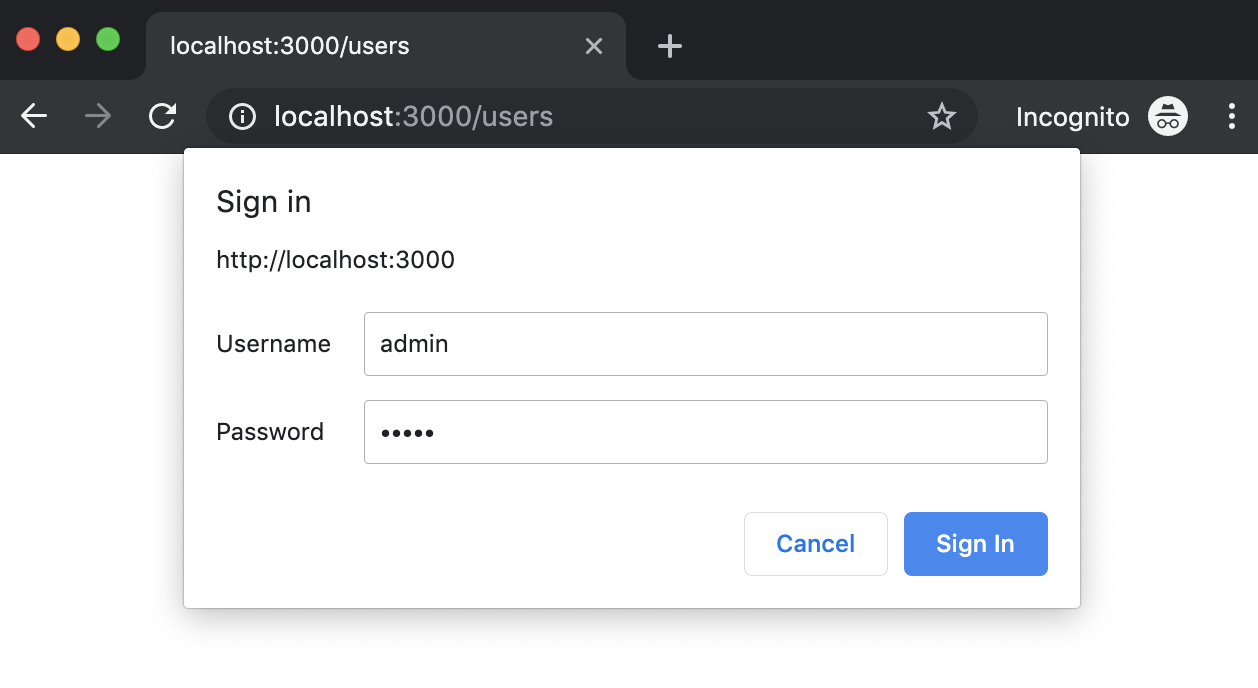
    Let’s build a small site in Node.js using Express that will have one protected page

    Http auth basic prompt dialog

    We are going to use express generator to generate some scaffolding. If you didn’t install it just type this command to install it globally but if you already know all this stuff you might skip it and go direct to The Magic section

     npm install express-generator -g
    

    Generate a site with default options:

    express auth-basic
    

    The output of that command will show you the generated files

       create : auth-basic/
       create : auth-basic/public/
       create : auth-basic/public/javascripts/
       create : auth-basic/public/images/
       create : auth-basic/public/stylesheets/
       create : auth-basic/public/stylesheets/style.css
       create : auth-basic/routes/
       create : auth-basic/routes/index.js
       create : auth-basic/routes/users.js
       create : auth-basic/views/
       create : auth-basic/views/error.jade
       create : auth-basic/views/index.jade
       create : auth-basic/views/layout.jade
       create : auth-basic/app.js
       create : auth-basic/package.json
       create : auth-basic/bin/
       create : auth-basic/bin/www
    

    Go into the folder, build the project with install and run it.

    cd auth-basic
    npm install
    npm start
    

    Open a browser at: http://localhost:3000 to validate everything goes well. You should see a web page like this:

    Default Express welcome page

    The magic

    Now let’s install the module express-basic-auth that will do the magic.

    npm install --save express-basic-auth
    

    Modify the module /routes/users.js

    var express = require('express');
    var router = express.Router();
    
    const basicAuth = require("express-basic-auth");
    
    const authOptions = {
      challenge: true, //it will cause most browsers to show a popup to enter credentials on unauthorized responses,
      users: {"admin": "admin"},//typically you will get  this info from environment variables or any other source
      authorizeAsync: false,
      unauthorizedResponse: getUnauthorizedResponse,
    };
    
    /**
     *
     * @param req
     * @returns {string} the text to be displayed when users hit on cancel prompt button
     */
    function getUnauthorizedResponse(req) {
      return "Unauthorized";
    }
    
    /**
     *  GET users listing.
     */
    router.get('/', basicAuth(authOptions), function(req, res, next) {
      res.send('Users listing area');
    });
    
    module.exports = router;


    Stop and run again

    Navigate to http://localhost:3000/users

    You should see a prompt that asks you for credentials. Try click on cancel button and then refresh the page to introduce the credentials you wrote in the code.

    Photo by Jon Moore on Unsplash

    Share this:

    • Click to share on X (Opens in new window) X
    • Click to share on LinkedIn (Opens in new window) LinkedIn
    • Click to share on Reddit (Opens in new window) Reddit
    • Click to email a link to a friend (Opens in new window) Email
    Like Loading…
  • Node.js REST Frameworks Benchmarks – reloaded (09/08/2019)

    August 9th, 2019

    kyberneees's avatarThe JavaScript and Node.js Blog

    I just got the new MacBook Pro 2019 and damm, it is a crazy fast laptop. Thanks to ShareNow Tech for offering such a tools to employees…

    A detailed performance review for the Macbook Pro can be found here: https://www.laptopmag.com/reviews/laptops/2019-macbook-pro-15-inch)

    Second thing after celebrating and setting the Node.js development environment up, was to measure the I/O performance of the following REST frameworks on their last stable version:

    • Vanilla Node.js
    • Koa
    • Express
    • Fastify
    • 0http (with uWebSockets.js)
    • Restana
    • Polka

    NOTE: Network throughput is not the only factor that matter while selecting a backend framework, if you don’t care about low level performance optimisations, is just fine!

    Out of the Box tests, single threaded “Hello World” HTTP services

    In this tests the services are running using a single process, the Node.js cluster mode is not used for the HTTP Servers.

    The tests sources can be found in the restana github repository:

    View original post 389 more words

    Share this:

    • Click to share on X (Opens in new window) X
    • Click to share on LinkedIn (Opens in new window) LinkedIn
    • Click to share on Reddit (Opens in new window) Reddit
    • Click to email a link to a friend (Opens in new window) Email
    Like Loading…
  • How Much Does Blogging Really Cost? — Jenny in Neverland

    July 22nd, 2019

    Self hosting, WordPress packages, domain names

    This is a big one for when you want to start taking your blog seriously or think about taking your blog to that next level. To turn your hobby blog into a business or an income then you’ll need to be thinking about at least getting your own domain name. And that’s the very least.

    I currently pay for the Business package on WordPress, which sets me back around £260 a year. It’s quite a daunting figure to look at but over the course of a year, I think that’s okay. But that’s my personal situation. So using that as a guideline, self hosting, WordPress packages or domain names might set you back between £10 – £260 a year.

    The reason I chose this option was simply because I’m not technically minded and I don’t have the skills to go self hosted by myself through an external company. If this is something you’re considering, check out the WordPress plans here or this post by Glow Steady about her switch to Lyrical Host, which is very informative!

    https://jennyinneverland.com/2019/07/15/how-much-does-blogging-cost/

    Photo by Fabian Blank on Unsplash

    Share this:

    • Click to share on X (Opens in new window) X
    • Click to share on LinkedIn (Opens in new window) LinkedIn
    • Click to share on Reddit (Opens in new window) Reddit
    • Click to email a link to a friend (Opens in new window) Email
    Like Loading…
  • Raspberry Pi 4: 48 hours later — Raspberry Pi Blog – Raspberry Pi — GeekMustHave

    July 21st, 2019

    >>> https://geekmusthave.com/?p=6259

    Photo by Louis Reed on Unsplash

    Share this:

    • Click to share on X (Opens in new window) X
    • Click to share on LinkedIn (Opens in new window) LinkedIn
    • Click to share on Reddit (Opens in new window) Reddit
    • Click to email a link to a friend (Opens in new window) Email
    Like Loading…
←Previous Page
1 … 20 21 22 23 24 25
Next Page→

  • LinkedIn
  • GitHub
  • WordPress

Privacy PolicyTerms of Use

Website Powered by WordPress.com.


Loading Comments...
 

    • Subscribe Subscribed
      • javaniceday.com
      • Already have a WordPress.com account? Log in now.
      • javaniceday.com
      • Subscribe Subscribed
      • Sign up
      • Log in
      • Report this content
      • View site in Reader
      • Manage subscriptions
      • Collapse this bar
    %d